









Key Takeaways
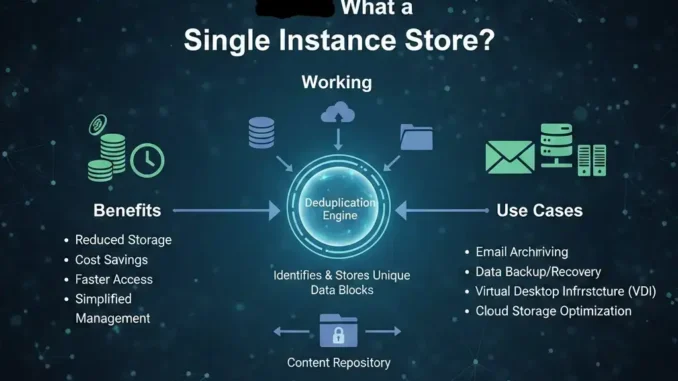
- Understanding the Concept: A single instance store (SIS) is a method used to save disk space by storing only one copy of a file or data chunk, even if many users need it.
- Massive Space Savings: By eliminating duplicate files, companies can reclaim significant amounts of storage, which lowers costs.
- Efficiency Boost: Backups become faster and network traffic is reduced because less data needs to be moved around.
- Common Uses: This technology is often found in email servers (like Microsoft Exchange) and file systems to manage identical attachments and documents.
- The Future of Storage: While older versions of SIS are being replaced by modern deduplication, the core concept remains vital for data management.
Have you ever wondered why your computer or email server fills up so fast? We all send files back and forth constantly. Imagine you send a funny photo to ten friends. In a traditional system, that photo is saved ten separate times on the server. That seems like a huge waste, right? This is where a single instance store comes to the rescue. It is a smart way for computers to stop hoarding copies of the same thing.
Instead of keeping ten copies of that photo, the system keeps just one. Then, it creates little pointers or shortcuts for everyone else. Everyone thinks they have their own copy, but really, they are all looking at the same original file. It is like a library having one book that everyone can read at the same time. This article will explain exactly how this works, why it matters, and how it helps keep our digital world organized.
What Is a Single Instance Store?
A single instance store is a storage optimization technique designed to eliminate data duplication. Think of it as a super-efficient digital housekeeper. Its main job is to look through all the files on a storage device and identify duplicates. When it finds identical files, it keeps one master copy and deletes the rest. In their place, it leaves a reference—a kind of digital signpost—that points back to the master copy.
This process is completely invisible to the user. If you and your coworker both save the same PDF report, you both see the file in your folders. You can open it, read it, and even delete your “copy” without affecting the other person. The system is smart enough to know when the last person deletes the file, which is the only time the actual data gets removed. This technology has been a cornerstone of efficient data management for years, helping organizations save money on expensive hard drives and servers.
The Basic Mechanics of SIS
So, how does the magic happen? It all comes down to comparing data. When a file enters the system, the single instance store mechanism scans it. It might check the file name, size, and most importantly, the content inside. It often uses a “hash”—a unique digital fingerprint—to identify the file. If two files have the exact same fingerprint, the system knows they are identical.
Once a match is found, the system saves the new file’s location but doesn’t write the actual data to the disk again. Instead, it links that location to the data that is already there. This happens very quickly. For the user, saving a file feels exactly the same. But under the hood, the server is doing a lot less work. It doesn’t have to write megabytes of data; it just updates a small index or database. This efficiency is why IT professionals love this technology.
Why Do We Need Single Instance Storage?
The explosion of data in recent years is staggering. We are creating more documents, images, and videos than ever before. Without technologies like single instance store, we would run out of space incredibly fast. Businesses hoard data. Employees email the same presentation to 50 people. Marketing teams save multiple versions of the same video. All this duplication creates what we call “data bloat.”
Data bloat is expensive. Hard drives cost money, but the real cost is in management. Backing up duplicate data takes longer. restoring it takes longer. Moving it across a network slows down the internet for everyone. We need SIS to keep things lean. It acts as a compression tool for the entire storage system, ensuring that we only use the resources we actually need. It allows companies to grow their data without constantly buying new hardware.
The Problem of Data Redundancy
Redundancy is a fancy word for “extra copies we don’t need.” In some cases, redundancy is good—like having a backup in case a drive fails. But in active storage, redundancy is a silent killer of efficiency. Let’s look at a simple example.
Imagine a company with 1,000 employees. The CEO sends an email with a 10MB attachment to everyone.
- Without SIS: The server stores 1,000 copies of that 10MB file. That equals 10,000MB or 10GB of space used instantly for one email.
- With SIS: The server stores 1 copy (10MB) and 999 tiny pointers.
The difference is massive. Without a single instance store, storage administrators are constantly fighting a losing battle against duplicate files. They have to spend their budgets on more disks just to store the same files over and over again.
How Single Instance Store Works in Email
One of the most famous uses of single instance store technology was in Microsoft Exchange Server. Email systems are notorious for duplication. People love to hit “Reply All” with attachments still attached. They forward jokes, videos, and large documents constantly. An email server without deduplication fills up incredibly fast.
In older versions of Exchange, the SIS architecture was built right into the database. When an email arrived, the Information Store process would check if the message body or attachments already existed. If they did, it would link the new recipient to the existing data. This was revolutionary for the time. It meant that email administrators could host many more mailboxes on the same server hardware. Although newer versions of Exchange have moved toward different methods to handle larger, cheaper disks, the concept of SIS in email remains a perfect example of why this tech matters.
Attachments vs. Message Bodies
It is important to note that a single instance store can work at different levels. Sometimes it looks at the whole message, but often the biggest savings come from attachments. Text emails are very small—usually just a few kilobytes. But attachments can be huge—megabytes or even gigabytes.
Focusing on attachments gives the best “bang for your buck.” Even if the message body is slightly different (for example, if someone adds “Please read this” before forwarding), the attachment usually stays the same. A smart SIS system can recognize that the 20MB PowerPoint file is identical, even if the email subject line has changed. By decoupling the attachment from the message, the system maximizes efficiency where it counts the most.
Single Instance Store vs. Deduplication
You might hear the word “deduplication” used alongside SIS. Are they the same thing? Yes and no. Single instance store is generally considered a file-level form of deduplication. It looks at whole files. If file A matches file B, keep one.
Modern data deduplication often goes deeper. It uses “block-level” deduplication. This means it breaks a file down into tiny chunks (blocks). If you change just one sentence in a 100-page document, a file-level SIS might see it as a “new” file and save a whole new copy. However, block-level deduplication recognizes that 99% of the blocks are the same and only saves the new blocks. While SIS is the grandparent of these technologies, understanding the difference helps us appreciate how storage tech has evolved.
Comparison Table: SIS vs. Block-Level Deduplication
|
Feature |
Single Instance Store (SIS) |
Block-Level Deduplication |
|---|---|---|
|
What it compares |
Whole files |
Small chunks of data (blocks) |
|
Efficiency |
Good for exact copies |
Excellent for modified files |
|
Processing Power |
Low CPU usage |
High CPU usage |
|
Best Use Case |
Email attachments, file servers |
Backups, virtual machines |
|
Complexity |
Simple |
Complex |
Benefits of Using Single Instance Store
The advantages of implementing a single instance store go beyond just saving a few gigabytes. It transforms how an IT department operates. When you reduce the data footprint, everything gets lighter and faster.
- Lower Hardware Costs: You buy fewer hard drives.
- Faster Backups: Backing up 1TB of data takes much less time than backing up 10TB of duplicate data.
- Reduced Network Strain: Moving smaller amounts of data keeps the internet connection fast for other tasks.
- Simplified Management: It is easier to manage one master file than thousands of copies.
For a business trying to stay lean and profitable, these are huge wins. It allows resources to be directed toward innovation rather than just maintaining storage closets full of hard drives.
File System Implementation (Winstore)
Windows developed a specific feature called the Single Instance Storage filter driver (or Winstore). This was used in Windows Storage Server. It worked in the background, constantly scanning the hard drive. When it found duplicates, it moved the data to a hidden folder called the “Common Store” and replaced the original files with “reparse points.”
A reparse point is just a fancy link. When a user tries to open the file, the operating system sees the reparse point, quickly grabs the data from the Common Store, and serves it up. The user never knows the file was moved. This seamless integration is key. If users had to follow special steps to open their files, they would hate it. Because single instance store works invisibly, it provides benefits without changing user behavior.
The Common Store Folder
The heart of the Windows implementation is the Common Store. This is a secure, hidden area on the disk where the unique files live. Think of it as the vault. Only the system can put things in or take things out directly.
Having a central vault ensures data integrity. If the system just left the one copy in “User A’s” folder and pointed everyone else there, what would happen if User A deleted it? Chaos. By moving the master copy to the Common Store, the system ensures that the data is safe as long as at least one person still needs it. The file is only removed from the vault when the very last reference to it is deleted.
Risks and Downsides
No technology is perfect, and single instance store has its risks. The biggest fear is the “single point of failure.” If you have 1,000 copies of a file and one gets corrupted, you still have 999 good copies. But if you use SIS, you only have one copy. If that one file in the Common Store gets corrupted or sits on a bad sector of the hard drive, all 1,000 users lose access.
This is why backups are critical. When using SIS, you must have a robust backup strategy. Another downside is the processing time. Although minimal, the server does have to calculate hashes and manage the database of links. On very old or overloaded servers, this could cause a slight delay, though on modern hardware, it is usually negligible.
Single Instance Store in Backup Solutions
Backup is perhaps the area where deduplication and single instance store shine the brightest. Most backups contain 90% of the same data as the day before. If you back up your computer every day, most of your files haven’t changed.
Backup software uses SIS logic to avoid saving the same files repeatedly. This is often called “incremental” backup strategy, but modern software takes it further with deduplication. This allows companies to keep months or years of backup history without needing a warehouse full of tapes or disks. It makes recovering from a disaster, like a ransomware attack or a server crash, much faster and more reliable.
Saving Bandwidth
In cloud backups, single instance store is a lifesaver for internet bandwidth. Imagine backing up your office server to the cloud. If you had to upload every file every night, it would choke your internet connection.
With SIS, the software checks the cloud first. “Do you already have this file?” it asks. If the cloud says yes, the software skips the upload and just marks it as “present.” This means only truly new or unique data gets sent over the internet. This saves huge amounts of time and data usage fees, making cloud backup affordable for small businesses.
The Evolution into the Cloud
Cloud storage services like Dropbox, Google Drive, and OneDrive rely heavily on concepts similar to single instance store. When you upload a popular song or a viral video to your cloud drive, chances are thousands of other people have already uploaded it.
Cloud providers use this to their advantage. They don’t want to store a million copies of the same viral video. They store it once and give everyone access to it. This “client-side” deduplication sometimes happens before the file even leaves your computer. If the cloud recognizes the file hash, the upload finishes instantly. That is the power of SIS working at a global scale.
When Should You Use SIS?
Is single instance store right for everyone? Generally, yes, but it depends on your data.
- Good Candidates: File servers with shared folders, email servers, software development repositories (where many code libraries are the same), and backup archives.
- Bad Candidates: Encrypted data (encryption makes every file look unique), compressed video or audio files (which are already highly unique), and databases that change constantly.
Before turning on any deduplication feature, IT administrators usually run a tool to estimate the savings. If the estimated space saving is less than 10-15%, it might not be worth the processing overhead. But for most general file servers, the savings are usually 30-50% or more.
Conclusion
The single instance store is a powerful concept that has shaped how we manage digital storage. By smartly identifying and removing duplicate files, it saves space, reduces costs, and improves system performance. While newer technologies like block-level deduplication have evolved from it, the core idea remains the same: why keep two when one is enough?
As we continue to generate more data every day, efficiency becomes more critical. Whether it is in your email server, your office file share, or the cloud services you use daily, this technology is working silently in the background to keep our digital lives organized. For more insights on technology and efficiency, you can check out resources at Silicon Valley Time. It is fascinating to see how simple logic applied to complex systems can result in such massive benefits for everyone involved. For a deeper technical dive, you can always find a link from Wikipedia related to this keyword ” single instance store ” and explore the history of how file systems have evolved to handle our growing data needs.
Frequently Asked Questions (FAQ)
Q1: Does single instance store slow down my computer?
No, generally it does not. The process happens very quickly in the background. While the server does a little extra math to find duplicates, the time saved by reading and writing less data usually makes the system feel faster, not slower.
Q2: Is single instance store the same as compression?
No. Compression (like a .zip file) makes a single file smaller by removing empty space inside it. Single instance store removes entire duplicate files. You can use both together for maximum space savings.
Q3: What happens if I delete a file that is being shared?
Nothing bad happens! The system is smart. If you delete your “copy,” the system just removes your link to the file. The actual master data stays in the store until the very last person deletes their link.
Q4: Can I use SIS on my home computer?
Windows and macOS have built-in deduplication features, but they are often reserved for “Server” versions of the operating system. However, many backup programs you use at home utilize this technology to save space on your external backup drive.
Q5: Is it safe to use single instance store?
Yes, it is very safe and has been used by major companies for decades. The only risk is if the physical hard drive gets damaged where the “master” file is stored. This is why having a good backup is always recommended.




