









In a world filled with countless devices, from smartphones to laptops and tablets, moving files between them can often feel like a complicated puzzle. You might email a document to yourself, use a cloud service for a photo, or fumble with a USB cable for a video. But what if there was a simpler, faster way? This is where SHAREit comes in. It’s a popular application designed to make sharing files of all types and sizes incredibly easy, without needing an internet connection. Whether you’re a student sharing project files, a professional sending a presentation, or just someone wanting to move photos to a new phone, SHAREit offers a straightforward solution. This guide will walk you through everything you need to know about this powerful tool.
What Exactly is SHAREit?
At its core, SHAREit is a free-to-use application that allows you to transfer files between devices at high speeds. Unlike traditional methods that rely on Bluetooth or cloud storage, SHAREit creates a direct Wi-Fi connection between the devices. This means you aren’t using your mobile data or depending on a spotty internet connection to send or receive files. The app was developed to solve the common problem of slow and cumbersome file transfers. It supports a vast range of file types, including photos, videos, music, documents, and even installed apps. With a user base of over a billion people worldwide, it has become a go-to tool for quick and efficient data sharing across different operating systems like Android, iOS, Windows, and macOS. The beauty of the SHAREit platform is its simplicity and speed, often reaching transfer rates that are significantly faster than Bluetooth.
Key Takeaways
- SHAREit is a cross-platform file-sharing application for fast transfers without an internet connection.
- It works by creating a direct Wi-Fi hotspot between devices, ensuring high-speed transfers.
- The app supports a wide variety of file types, including photos, videos, music, documents, and even entire applications.
- It is a popular alternative to traditional methods like Bluetooth, email, or cloud services due to its speed and convenience.
- SHAREit offers additional features like a media player, file manager, and content discovery platform.
How Does SHAREit Work Its Magic?
The technology behind SHAREit is what makes it so efficient. Instead of using a standard internet connection, the app utilizes a feature often called Wi-Fi Direct. When you want to send a file, the sending device essentially becomes a temporary Wi-Fi hotspot. The receiving device then connects directly to this hotspot. This creates a private, local network between the two devices, allowing for the rapid transfer of data. Because the connection is direct and doesn’t pass through a central router or the public internet, the speeds can be exceptionally fast—often advertised as being up to 200 times faster than Bluetooth.
This process eliminates several common frustrations. You don’t need to worry about using up your monthly data allowance, which is a major benefit when sharing large video files. You also aren’t limited by the slow speeds of Bluetooth or the need to upload a file to the cloud first, only to download it again on the other device. The direct connection method used by SHAREit is secure and ensures that your files are transferred only between the intended devices. This innovative approach is a key reason why so many people have adopted SHAREit for their daily file-sharing needs.
Getting Started with SHAREit: A Step-by-Step Guide
Using SHAREit is designed to be intuitive, even for those who aren’t tech-savvy. The process is similar across all supported platforms.
- Download and Install: The first step is to download the SHAREit app on all devices you plan to share files between. You can find it on the Google Play Store for Android, the Apple App Store for iOS, and the official SHAREit website for Windows and Mac computers.
- Open the App and Grant Permissions: When you open SHAREit for the first time, it will ask for several permissions. These typically include access to your files (so you can select them for sharing), location services (to find nearby devices), and the ability to manage Wi-Fi connections. These permissions are necessary for the app to function correctly.
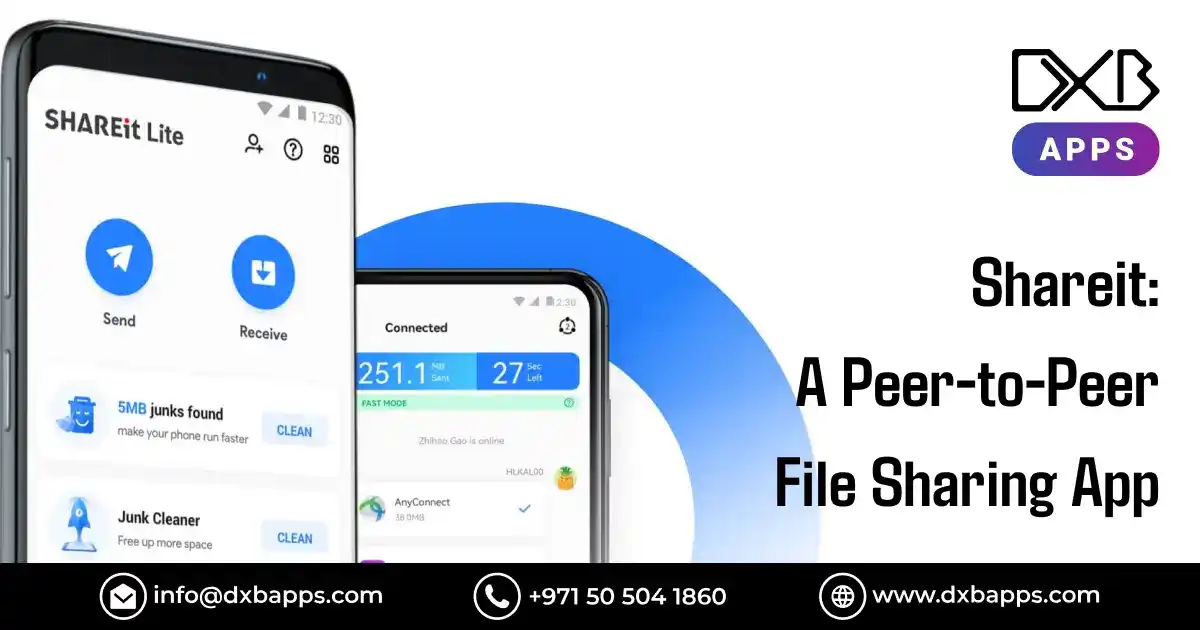
- Initiate a Transfer: On the sending device, tap the “Send” button. This will open your file manager, where you can browse and select the files you want to share. You can select one file or hundreds at once. After making your selection, tap “Send” again.
- Connect to the Receiver: The sending device will now start searching for nearby receivers. On the receiving device, tap the “Receive” button. The receiver will become visible to the sender. Simply tap on the receiver’s avatar on the sender’s screen to establish the connection.
- Watch the Files Fly: Once the connection is made, the file transfer will begin automatically. You can watch the progress in real-time. Thanks to the Wi-Fi Direct technology, even large files like movies can be transferred in just a few minutes.
This simple, straightforward process is what makes SHAREit a standout application in the crowded world of file-sharing utilities.
Exploring the Main Features of SHAREit
While high-speed file transfer is its primary function, the SHAREit application has evolved to include a suite of other useful features that enhance its value.
Cross-Platform Compatibility
One of the most significant advantages of SHAREit is its ability to work seamlessly across different operating systems. You can easily send a video from your Android phone to a friend’s iPhone, transfer a presentation from your Windows laptop to your MacBook, or move photos from your phone to your PC. This versatility eliminates the compatibility issues that often arise when trying to share files between devices from different manufacturers. This level of interoperability is crucial in today’s multi-device environment.
No Internet, No Problem
The core functionality of SHAREit revolves around its ability to transfer files without needing an internet connection. This is a game-changer for users in areas with poor connectivity, for those with limited mobile data plans, or for anyone who simply wants to share files quickly on the go without searching for a Wi-Fi network. Whether you are on a plane, on a road trip, or in a lecture hall, SHAREit allows you to share what you need, when you need it. This offline capability ensures that you are never restricted by your internet access.
More Than Just File Sharing
Modern versions of SHAREit have expanded beyond simple transfers. The app often includes:
- A built-in media player: You can watch videos and listen to music directly within the SHAREit app, without needing to switch to another player.
- A file manager: This allows you to browse, organize, and manage the files stored on your device.
- Content discovery: Some versions feature a feed with trending videos, music, and other content, turning the app into a mini entertainment hub.
These additional tools make SHAREit a more comprehensive utility, aiming to be an all-in-one solution for managing and enjoying your digital content.
SHAREit for PC: Bridging the Gap with Your Computer
The ability to connect your phone to a PC is one of the most practical uses of SHAREit. Transferring photos from a vacation or moving a downloaded document from your computer to your phone becomes effortless. The SHAREit PC client offers several powerful features designed to streamline this process.
How to Connect Your Phone to a PC with SHAREit
- Install the App: Ensure SHAREit is installed on both your smartphone and your Windows or Mac computer.
- Open Both Apps: Launch SHAREit on your phone and on your PC.
- Use the “Connect to PC” Feature: On your phone’s SHAREit app, look for an option like “Connect to PC” or “Scan to Connect.”
- Scan the QR Code: The PC application will display a QR code on the screen. Use your phone’s camera within the SHAREit app to scan this code.
- Connected!: The devices will connect instantly, creating a link for you to start transferring files in either direction.
This QR code method is incredibly user-friendly and avoids the hassle of manually searching for devices. Once connected, you can drag and drop files on your PC to send them to your phone, or browse your phone’s files from your computer to download them. This turns your PC into a powerful hub for managing your mobile files.
Safety and Security on the SHAREit Platform
When you’re sharing personal files, security is a top concern. SHAREit addresses this by using a direct, private connection. Since the files are not uploaded to a cloud server or sent over the public internet during the transfer, the risk of interception is significantly reduced. The transfer happens within a closed, local network created just for that session. However, like with any application, it’s essential to practice good digital hygiene. Only connect to devices you know and trust. Always download the SHAREit app from official sources like the Google Play Store, Apple App Store, or the official website to avoid modified or malicious versions. By following these simple precautions, you can use SHAREit with confidence, knowing your files are being transferred securely between your devices.
SHAREit vs. Competitors: A Quick Comparison
How does SHAREit stack up against other file-sharing methods? Let’s compare it to some common alternatives.
|
Feature |
SHAREit |
Bluetooth |
Cloud Services (e.g., Google Drive) |
|---|---|---|---|
|
Speed |
Very High (up to 20 MB/s) |
Low (up to 2-3 MB/s) |
Variable (depends on internet speed) |
|
Internet Required? |
No |
No |
Yes |
|
File Size Limit |
No practical limit |
Often limited for large files |
Depends on storage plan |
|
Cross-Platform |
Yes (Android, iOS, Windows, Mac) |
Yes (most devices) |
Yes (web and app-based) |
|
Setup |
Simple app-to-app connection |
Device pairing required |
Account login and upload/download |
As the table shows, SHAREit excels in speed and offline capability, making it the ideal choice for transferring large files quickly between nearby devices. While cloud services are excellent for storage and remote access, they can’t match the raw transfer speed of a direct Wi-Fi connection.
Tips and Tricks for Getting the Most Out of SHAREit
To become a SHAREit power user, keep these tips in mind:
- Group Sharing: Did you know you can create a group and share files with multiple people at once? This is perfect for study groups or sharing vacation photos with the whole family. Simply create a group and have others join it to receive files simultaneously.
- Share Installed Apps: On Android, SHAREit allows you to send the installation file (APK) of an app on your phone to another Android user. This is useful if your friend has trouble finding the app or has limited internet access.
- Use the WebShare Feature: The WebShare feature allows you to share files with another device using just a web browser. The receiving device scans a QR code and can download files through a web interface, without needing the SHAREit app installed.
- Keep the App Updated: For the latest features, security enhancements, and bug fixes, always make sure your SHAREit app is updated to the latest version. Tech news sites like those found at
https://siliconvalleytime.co.uk/often highlight major app updates and their new functionalities.
By using these features, you can turn SHAREit from a simple file-transfer tool into a powerful productivity and sharing utility.
Conclusion: Simplifying Your Digital Life with SHAREit
In a world where we juggle multiple devices and vast amounts of data, tools that simplify our digital lives are invaluable. SHAREit has successfully carved out a niche by providing a solution that is fast, easy to use, and incredibly versatile. By removing the dependency on internet connections and cumbersome cables, it empowers users to share what they want, when they want. From students and professionals to casual users, the application offers a tangible benefit: saving time and eliminating frustration. Whether you’re moving your digital life to a new phone, collaborating on a project, or just sharing a funny video with a friend, SHAREit proves to be a reliable and efficient companion.
The app’s ability to handle any file type across major operating systems makes it a must-have utility. Its evolution to include features like a media player and file manager shows a commitment to providing a comprehensive user experience. As file sizes continue to grow and our reliance on digital data deepens, the need for effective sharing solutions will only increase. With its innovative use of Wi-Fi Direct technology, SHAREit is well-positioned to remain a leading choice for users around the globe. To learn more about the technical aspects and history, you can find detailed information about the application on platforms like Wikipedia.
Frequently Asked Questions (FAQ)
Q1: Is SHAREit free to use?
Yes, SHAREit is a free application. It is supported by ads, which appear within the app’s interface. There are no subscription fees for its core file-sharing features.
Q2: Do I need an internet connection to use SHAREit?
No, you do not need an active internet connection or mobile data to transfer files with SHAREit. The app creates its own local Wi-Fi hotspot to transfer files directly between devices.
Q3: What types of files can I send with SHAREit?
You can send almost any type of file with SHAREit. This includes photos, videos, music, documents (PDF, Word, Excel, etc.), contacts, and even entire applications (on Android). There are no practical restrictions on file types or sizes.
Q4: Is SHAREit safe to use?
SHAREit is generally safe to use. It transfers files over a private, direct connection rather than the open internet. However, you should always download the app from official sources (like the Google Play Store or Apple App Store) and only connect with devices you trust.
Q5: Can I transfer files from my Android phone to an iPhone using SHAREit?
Yes, one of the biggest strengths of SHAREit is its cross-platform capability. You can easily and quickly transfer files between Android and iOS devices, as well as Windows and macOS computers.




