









Have you ever missed a permission slip buried at the bottom of a backpack? Or perhaps you’ve struggled to figure out exactly what homework is due tomorrow? If you are a parent, student, or teacher, you know that keeping track of school life can sometimes feel like a full-time job. This is where modern educational technology steps in to save the day. Specifically, platforms like edulink are changing the way schools communicate.
This guide is here to walk you through everything you need to know about edulink. We aren’t just talking about a simple app; we are exploring a comprehensive system designed to bridge the gap between home and the classroom. Whether you are looking to check attendance, view reports, or just message a teacher, understanding how this system works can make school life much smoother for everyone involved.
Key Takeaways
- Edulink serves as a central hub for school communication, attendance, and reporting.
- It simplifies tasks for parents, students, and teachers by reducing paperwork.
- The platform offers real-time access to grades, timetables, and behavior logs.
- Security and data privacy are top priorities within the system.
- Using the app can significantly improve student engagement and parental involvement.
What Is Edulink and How Does It Work?
At its core, edulink is a powerful communication and engagement platform designed for schools. Think of it as a digital bridge. On one side, you have the school’s massive database of information—timetables, grades, attendance records, and exam schedules. On the other side, you have parents and students who need access to that information. Edulink connects the two sides seamlessly. It integrates directly with the school’s Management Information System (MIS), pulling data instantly so that what you see on your screen is always up to date.
The beauty of the system lies in its accessibility. It usually comes in the form of a web portal or a mobile app (Edulink One). This means you can check vital school information whether you are sitting at a desktop computer or standing in line at the grocery store with your smartphone. For schools, it reduces the administrative burden significantly. Instead of printing thousands of letters that might get lost, they can send a push notification directly to a parent’s pocket. It streamlines processes that used to take days into tasks that take seconds.
The Evolution of School Communication
Gone are the days when a phone chain or a crumpled newsletter was the only way to get news home. Education technology has evolved rapidly. Edulink represents the modern standard for this evolution. Initially, schools relied on basic SMS text messaging services, which were expensive and limited in what they could convey. Then came email, which was better but often got lost in spam folders.
Now, integrated platforms like edulink offer a “one-stop-shop” experience. They don’t just send messages; they allow for two-way interaction. Parents can update their contact details, report absences, and even book parents’ evening slots without making a single phone call. This evolution reflects a broader trend in society where we expect instant access to information. Schools adopting this technology are acknowledging that parents are busy and need efficient, reliable ways to stay connected to their children’s education.
Top Features of the Edulink Platform
When you first log in to edulink, you might be surprised by how many different icons or “widgets” are available. The platform is modular, meaning schools can choose which features to turn on based on what they need. However, there are several core features that most users will encounter. These features are designed to cover the most critical aspects of school administration and student monitoring.
Understanding these features helps you get the most out of the app. For instance, the ‘Documents’ feature allows schools to send report cards digitally. This saves trees and ensures that reports actually reach the parents. Another popular feature is ‘Catering’, which allows parents to see what their child has bought for lunch and check their remaining balance. This level of transparency is incredibly useful for managing lunch money and ensuring healthy eating habits.
Attendance Tracking Made Simple
One of the most used features within edulink is attendance monitoring. For parents, seeing a clear record of their child’s attendance is vital. The system usually displays attendance in a very visual way, often using color-coded charts to show present marks, late arrivals, and absences. If a student is marked absent, the system can trigger an immediate alert to the parent.
This real-time tracking does more than just report data; it helps safeguard students. If a child doesn’t arrive at school, parents know immediately, allowing them to take action if necessary. Furthermore, the platform often includes a feature to report absences. Instead of waiting on hold on the phone at 8:00 AM, a parent can simply open the app, select the “Absence Reporting” function, and submit the reason for their child’s illness. This feeds directly into the school’s system, saving time for the office staff.
Behavior and Achievement Logs
Schools aren’t just about grades; they are also about character development. Edulink allows schools to share behavior and achievement data instantly. In the past, you might only hear about a detention weeks later, or never hear about a merit point at all. With this app, these events are logged and visible as they happen.
- Achievement Points: When a student does well in class or helps a peer, teachers can award points that appear instantly in the app. This allows parents to celebrate small wins at home.
- Behavior Incidents: If a rule is broken, it is logged with details of the incident and any improved sanctions (like a detention).
- Detention Management: Parents can see when a detention is set, ensuring they know why their child might be late home.
This transparency creates a consistent loop of feedback. When parents are aware of both the good and the bad behavior immediately, they can support the school’s efforts more effectively at home.
How Edulink Benefits Parents and Guardians
The primary beneficiaries of edulink outside of the school administration are undoubtedly the parents. Parenting a school-aged child involves a lot of logistics. Managing homework schedules, remembering non-uniform days, and keeping track of exam dates can be overwhelming. This platform acts as a personal assistant for your child’s education.
By centralizing information, it reduces anxiety. You no longer have to rely on your child to remember to tell you things. If there is a school trip coming up, the details are likely in the app. If there is a parents’ evening, you can book your appointments through the system rather than relying on a paper slip. This empowerment allows parents to be proactive rather than reactive regarding their child’s schooling.
Streamlining Parents’ Evening Bookings
Historically, parents’ evening bookings were a nightmare. Students were given a sheet of paper and told to run around to their teachers to sign up for slots. This often resulted in lost sheets, double bookings, or appointments spread out over four hours with huge gaps in between. Edulink revolutionized this with its booking feature.
Now, parents log in and see a list of their child’s teachers. They can select available slots that suit their schedule. The system automatically blocks out times that are already taken, preventing double bookings. It can even suggest the most efficient schedule to minimize waiting time between appointments. For families with multiple children at the same school, this coordination is a massive time-saver and stress reducer.
Homework Management and Deadlines
“I don’t have any homework” is a phrase every parent has heard. Sometimes it’s true; often it isn’t. Edulink removes the guesswork. Most schools link their homework setting software directly to the app. This means parents can view exactly what tasks have been assigned, the details of the assignment, and the due date.
This feature helps parents support their children in managing their time. If you can see that a big project is due next Thursday, you can encourage your child to start working on it over the weekend. It also helps in identifying struggles early. If you see homework consistently marked as “not submitted,” you can address the issue with your child or the teacher before it affects their final grades.
Comparison: Traditional School Communication vs. Edulink
|
Feature |
Traditional Methods |
Using Edulink |
|---|---|---|
|
Report Cards |
Printed, mailed, or sent home with students (often lost). |
Digital PDF, instantly available, stored securely. |
|
Absence Reporting |
Phone calls to busy office lines. |
Quick digital submission via app. |
|
Emergency News |
Phone chains or radio announcements. |
Instant push notifications to all devices. |
|
Parents’ Evening |
Paper sign-up sheets managed by students. |
Online booking system managed by parents. |
|
Homework |
Written in a physical planner (or forgotten). |
Visible online with due dates and details. |
Why Schools Are Switching to Edulink
Schools are under immense pressure to save money and improve efficiency. Adopting edulink is often a strategic decision to achieve both. The cost of paper, printing, and postage for a large secondary school can be astronomical. By moving communications online, schools can save thousands of dollars annually. These funds can then be redirected into classroom resources or student support services.
Beyond cost, the administrative efficiency is undeniable. Office staff spend countless hours manually entering data or chasing up unreturned forms. Edulink automates data collection. For example, the “Data Collection” feature allows parents to update their own phone numbers and addresses. The school simply reviews and approves the change, rather than typing it in manually. This ensures that the school’s data is cleaner and more accurate, which is crucial in emergencies.
Improving Student Outcomes
While the administrative benefits are great, the ultimate goal of any educational tool is to help students succeed. There is a strong link between parental engagement and student achievement. When parents are involved and informed, students tend to do better. Edulink facilitates this engagement by lowering the barriers to information.
When a student knows that their parents can see their homework and behavior in real-time, it creates a layer of accountability. But more importantly, it creates a support network. If a student is falling behind, the data is visible early on via interim reports or grade checks in the app. This allows for early intervention, such as tutoring or extra help, which can make the difference between passing and failing.
Navigating the Edulink App: A User Guide
Using edulink is designed to be intuitive, but a quick walkthrough can help new users feel more comfortable. When you download the app (usually called Edulink One) from the App Store or Google Play Store, you will need a school ID or postcode to find your specific institution. Once you locate your school, you log in with the username and password provided to you.
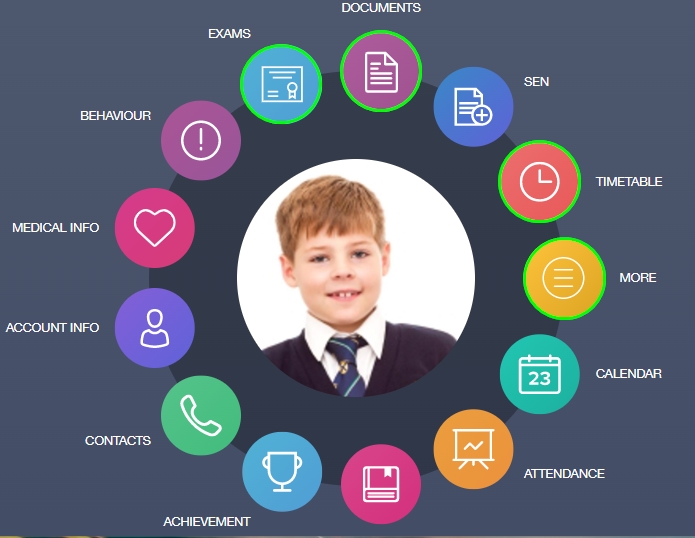
The dashboard is the home screen. It is usually a grid of circular icons, each representing a different function like ‘Timetable’, ‘Exams’, ‘Account’, etc.
- Timetable: Clicking this shows the student’s schedule for the day or week. It often includes room numbers and teacher names.
- Contacts: This allows you to see contact details for the school and sometimes email teachers directly.
- Account Info: This shows the personal details the school holds for you and your child.
Customizing Your Notifications
One of the most powerful aspects of the app is the ability to control notifications. You don’t want your phone buzzing every five minutes, but you also don’t want to miss an emergency alert. In the settings menu of edulink, users can typically customize their preferences.
You might choose to receive push notifications for urgent messages and absences but turn them off for general newsletters. However, it is highly recommended to keep notifications on for “Messages” and “Behavior” to stay in the loop. Schools can also see if a message has been read, which helps them know that their communication has been successful. Customizing these settings ensures the app serves you without becoming a nuisance.
Data Privacy and Security in Edulink
In an age where data breaches are common news, parents are rightfully concerned about the safety of their child’s data. Edulink takes security very seriously. The platform is designed to be GDPR compliant (for users in Europe) and adheres to strict data protection regulations globally. The data is not stored loosely on a phone; it is encrypted and pulled securely from the school’s servers.
Access is strictly controlled. Only authorized users with specific login credentials can see student data. Furthermore, the app often supports two-factor authentication or biometric login (like fingerprint or face ID) on mobile devices. This adds an extra layer of security, ensuring that if you lose your phone, a stranger cannot access your child’s personal information or school records.
Who Has Access to What?
It is important to understand that edulink has different access levels.
- Administrators: Have full access to configure the system and view all data.
- Teachers: Can view data relevant to their classes and students, set homework, and log behavior.
- Parents: Can view data related specifically to their own children. They cannot see information about other students.
- Students: Have their own login to view their timetable, homework, and grades, helping them take ownership of their learning.
This tiered access ensures privacy is maintained while ensuring everyone has the information they need to play their role in the educational ecosystem.
Troubleshooting Common Issues
Like any technology, users might occasionally face hiccups when using edulink. The most common issue is login failure. This is often due to a forgotten password or the school updating its server settings. If you cannot log in, the first step is usually to use the “Forgotten Password” link. If that fails, contacting the school’s IT support or administrative office is the best course of action.
Another issue can be missing data. If you log in and see a blank timetable or missing grades, it is rarely a fault with the app itself. Usually, this means the school hasn’t uploaded that specific data set yet or there is a lag in the sync between the school’s MIS and the app. Giving it a few hours often resolves the glitch. Also, ensuring your app is updated to the latest version solves many performance bugs.
Why Is My App Not Syncing?
Syncing issues can happen if your internet connection is unstable or if the school’s servers are down for maintenance. Edulink relies on an active internet connection to pull live data. If you are in an area with poor signal, the app might show cached (old) data or fail to load.
If you notice that the app isn’t syncing:
- Check your Wi-Fi or data connection.
- Close the app completely and reopen it.
- Check if there is an update available in your app store.
- If the problem persists for more than a day, alert the school so they can check their system integration.
The Future of Edulink and EdTech
The world of educational technology is moving fast. As schools become more digital, platforms like edulink will likely become even more integrated into daily life. We might see features expanding to include AI-driven learning suggestions, where the app analyzes a student’s grades and suggests specific revision topics.
We may also see deeper integration with other platforms, such as Google Classroom or Microsoft Teams, creating a seamless learning environment where assignments, video lessons, and parental communication all happen in one ecosystem. For insights into how technology continues to shape our world, you can explore resources at https://siliconvalleytime.co.uk/, which discusses broader tech trends that eventually influence educational tools like this one.
Is Edulink the Right Choice for Every School?
While edulink is powerful, schools must decide if it fits their specific needs. It works best for schools that are ready to embrace digital transformation. If a school struggles with basic internet infrastructure or has a community with limited access to smartphones, the implementation might be challenging.
However, for the vast majority of modern schools, the benefits outweigh the hurdles. The shift toward paperless communication is inevitable. Tools that offer a centralized, secure, and user-friendly experience are setting the standard. By adopting such systems, schools are future-proofing their administration and providing a better service to their community.
Conclusion
Navigating the school years can be complex, but technology is making it significantly easier. Edulink stands out as a robust solution that brings teachers, parents, and students onto the same page. By centralizing communication, tracking attendance, and providing real-time data on behavior and achievement, it removes the “black box” nature of schooling. Parents are no longer left in the dark, and students are empowered to manage their own schedules.
Whether you are checking a lunch balance or celebrating a merit point, the transparency provided by edulink fosters a more collaborative educational environment. As technology continues to advance, we can expect these tools to become even more integral to the success of students everywhere.
Frequently Asked Questions (FAQ)
Q1: Is the edulink app free for parents?
Yes, the app is free for parents and students to download. The school pays for the subscription to the service.
Q2: Can I use edulink for multiple children at the same school?
Absolutely. One of the best features is the ability to toggle between different children within the same app account, keeping all information in one place.
Q3: What do I do if I see incorrect information about my child?
You should contact the school office immediately. You can often use the messaging feature within the app to flag the error to the relevant staff member.
Q4: Is my data safe on this platform?
Yes, the platform uses advanced encryption and security protocols to ensure student and parent data is protected and GDPR compliant.
Q5: Can I turn off notifications?
Yes, you can customize your notification settings inside the app to choose which alerts you want to receive.
For more information on the broader context of educational technology and software, you can visit this link on Educational technology.




