
Introduction to Modern Assessment Tools
Imagine a classroom where every student gets exactly what they need, right when they need it. Teachers aren’t guessing who understands the math lesson from yesterday; they know for sure. This is the promise of modern educational technology. In schools across the country, the way we look at grades and tests is changing. We are moving away from simple letter grades like A, B, or C, and moving toward understanding exactly what skills a student has mastered. To make this shift happen, schools need powerful tools. One of the leading platforms making waves in education today is mastery connect.
This tool is designed to help teachers track student learning in real-time. It isn’t just a digital gradebook; it is a complete system for standards-based learning. Whether you are a teacher trying to organize your data, an administrator looking for big-picture trends, or a parent wanting to know how your child is really doing, understanding this platform is crucial. It bridges the gap between curriculum, assessment, and instruction.
In this extensive guide, we will dive deep into everything you need to know about mastery connect. We will explore how it works, why schools are choosing it, and how it changes the daily life of students and educators. By the end of this article, you will have a clear picture of how data-driven instruction can revolutionize the learning experience.
Key Takeaways
- Real-Time Tracking: Learn how teachers see student progress instantly.
- Standards-Based Grading: Understand the shift from traditional grades to mastery levels.
- Collaborative Tools: Discover how educators share resources and assessments.
- Parental Insight: See how families can get a clearer view of student learning.
- Data-Driven Decisions: Explore how schools use data to improve teaching methods.
What is Mastery Connect?
At its core, mastery connect is a competency-based learning platform. It allows educators to track student mastery of state and Common Core standards. Instead of just giving a student a score of 80% on a test, the platform breaks that test down. It shows that the student perfectly understood “multiplication” but struggled with “division.” This level of detail changes everything. It moves the focus from “What grade did I get?” to “What did I learn?”
The platform was built with the idea that assessment shouldn’t be a surprise event at the end of a unit. Instead, assessment should be happening all the time to guide instruction. It integrates with many other tools schools already use, making it a central hub for academic data. Teachers can upload their own assessments or use a vast library of shared content created by other educators. This community aspect is a huge part of its success.
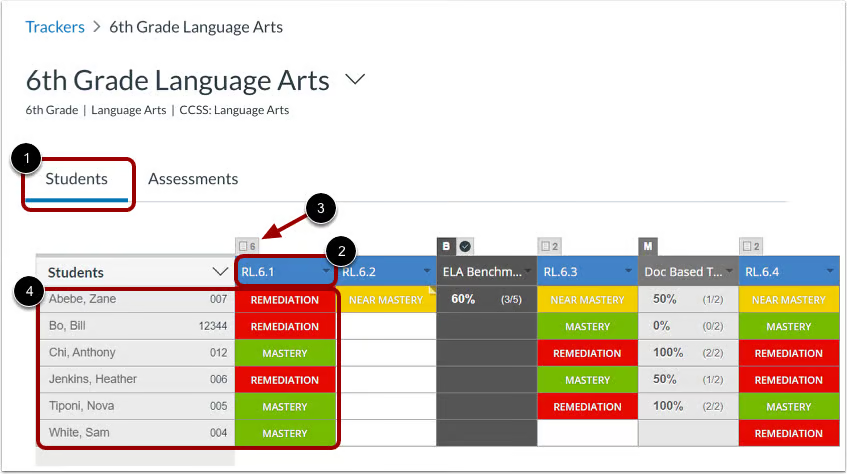
Furthermore, mastery connect provides visual reports. Teachers don’t have to spend hours crunching numbers in a spreadsheet. The system generates color-coded trackers—usually green for mastery, yellow for near mastery, and red for remedial—that let a teacher scan a class list and know immediately who needs help. This efficiency saves teachers time, allowing them to focus more on teaching and less on administrative tasks.
The Philosophy Behind Mastery Learning
To truly understand the tool, you have to understand the philosophy. Mastery learning suggests that students must achieve a level of mastery (e.g., 90% on a knowledge test) in prerequisite knowledge before moving forward to learn subsequent information. If a student does not achieve mastery on the test, they are given additional support in learning and reviewing the information and then tested again. This cycle continues until the learner accomplishes the mastery, and they may then move on to the next stage.
mastery connect is the digital engine that powers this philosophy. In a traditional classroom, the class moves on to Chapter 5 whether the student understood Chapter 4 or not. With mastery learning supported by technology, the teacher can see that five students didn’t get Chapter 4. The teacher can then pull those students into a small group for re-teaching while the rest of the class works on enrichment activities. This ensures no child is left behind due to the pace of the curriculum.
The Core Features of Mastery Connect
The platform is packed with features designed to make a teacher’s life easier and a student’s learning more transparent. One of the primary features is the “Tracker.” The Tracker is the heart of the system. It is where teachers pin their standards and upload assessments. It provides a visual grid of the class, showing exactly where every student stands on every standard. It is intuitive and colorful, making data analysis less intimidating.
Another massive feature is the Assessment Library. Teachers don’t always have to reinvent the wheel. mastery connect allows users to share assessments they have created. A teacher in Florida can use a geometry quiz created by a teacher in Oregon if it aligns with the same standard. This crowdsourcing of educational materials creates a rich repository of resources. It fosters a sense of community among educators who are all working toward the same goal: student success.
Additionally, the reporting tools are robust. Administrators can see data at a district level, a school level, or an individual classroom level. They can identify trends. For example, if 3rd graders across the entire district are failing a specific reading standard, the curriculum director knows they need to buy new resources or provide training for that specific skill. The data isn’t just sitting there; it is actionable.
Feature Breakdown
|
Feature Name |
Description |
Benefit |
|---|---|---|
|
The Tracker |
Visual dashboard of student progress. |
Instant view of class performance. |
|
Curriculum Map |
Organize standards into units. |
Keeps pacing consistent. |
|
Resource Pins |
Attach videos, worksheets, and links. |
Easy access to teaching materials. |
|
Bubblesheets |
Scan physical test sheets via webcam. |
Fast grading for paper tests. |
|
Gradebook Integration |
Syncs with systems like PowerSchool. |
Reduces double entry of grades. |
How Mastery Connect Supports Standards-Based Grading
Standards-Based Grading (SBG) is a different way of thinking about report cards. Traditional grading averages everything together: homework, participation, quizzes, and tests. A student might get a “B” because they did all their homework, even if they failed the test. Or they might get a “C” because they missed assignments, even though they know the material perfectly. This can be confusing. SBG separates behavior from academic skill.
mastery connect is built specifically for this model. In the system, a grade is tied directly to a specific skill, like “I can analyze the theme of a story.” The platform tracks performance on that specific skill over time. It allows for “decaying average” or “most recent score” calculations. This means if a student failed the first quiz but aced the final test, their grade reflects what they know now, not what they didn’t know three weeks ago.
This approach encourages a growth mindset. Students learn that it is okay to struggle at the beginning of a unit as long as they keep working toward mastery. The software visualizes this journey. A student can log in and see their own progress bars moving from red to yellow to green. This visual feedback is incredibly motivating and helps students take ownership of their own learning journey.
Setting Up Your First Tracker in Mastery Connect
For teachers new to the platform, setting up the first tracker is the first step toward data freedom. A “Tracker” is essentially your digital class record for a specific subject. To start, you select the subject (like Math or Science), the grade level, and the specific set of standards your state or district uses. The system then pulls in all the relevant learning targets automatically. You don’t have to type them in manually.
Once the standards are loaded, you add your students. Most districts have this synced automatically, but you can also add them manually or import them. Once the students are in, the grid appears. At first, it will be gray because there is no data. As you add assessments, the grid comes alive with colors. You can organize the standards into the order you plan to teach them, matching your curriculum map.
Customizing the tracker is also possible. You can group standards into “Power Standards” or “Priority Standards”—these are the most critical skills students must learn. By highlighting these, you ensure that you are focusing your energy on the most important material. This setup phase is crucial because a well-organized tracker makes the rest of the school year run smoothly.
Creating and Sharing Assessments
Assessment creation in mastery connect is flexible. You can create a test from scratch, typing in questions and selecting the correct answers. The platform supports multiple-choice, true/false, and even rubric-based grading for essays or projects. When you create a question, you tag it with a specific standard. This is the magic step. It ensures that when a student answers that question, the data goes to the right place in the tracker.
If you don’t want to write your own questions, you can use the Item Bank. This is a collection of pre-made questions that are already tagged with standards. You can search for a standard, find five questions you like, and assemble them into a quick quiz. This saves hours of prep time. You can also mix and match, adding a few of your own questions to a pre-made set.
Sharing is a big part of the culture. Once you make an assessment, you can publish it to the community or just share it with your grade-level team. This is great for Professional Learning Communities (PLCs). If all the 4th-grade teachers want to give the same math test to compare results, one teacher can make it in mastery connect and share it with the others instantly.
Formative vs. Summative Assessments
The platform handles both types of assessments beautifully. Formative assessments are the quick checks for understanding that happen during learning. You might use the tool to give a 3-question “exit ticket” at the end of class. The teacher scans the results instantly and knows who needs help tomorrow.
Summative assessments are the big end-of-unit tests. mastery connect can handle long exams with dozens of questions covering multiple standards. The system breaks down the results so the teacher can see that while the student got an 85% overall, they missed every question related to “vocabulary.” This insight is often lost in traditional grading systems but is highlighted here.
The Student Experience: Using the Student Portal
Students have their own view into mastery connect. When they log in, they don’t see a confusing spreadsheet. They see a user-friendly dashboard that shows their classes and their progress. They can see which standards they have mastered and which ones they are still working on. This transparency removes the mystery from grading. A student never has to ask, “Why do I have a C?” The answer is right there on the screen: “Because you haven’t mastered fractions yet.”
This portal also allows students to take tests online. In a computer lab or on a tablet, students can log in and take an assessment assigned by the teacher. The interface is clean and distraction-free. For younger students, the navigation is simple enough that they can use it with minimal help.
Empowering students to track their own data is a powerful educational strategy. When a student sees a red box turn into a green box after they studied and retook a test, they feel a sense of accomplishment. It gamifies the learning process in a way that is meaningful. It teaches them that effort leads to results, which is a life skill that goes far beyond the classroom.
H3: Promoting Student Agency
Student agency means giving students a voice and a choice in their learning. mastery connect supports this by making the goals clear. When a student knows exactly what the target is, they can aim for it. Some teachers use the platform to let students choose how they demonstrate mastery. A student might ask to do a project instead of a test, and the teacher can grade that project using a rubric in the system.
Also, students can use the feedback features. When a teacher grades an open-ended question, they can leave comments. Students can read these comments in the portal. This feedback loop is faster and more private than handing back papers in class. It allows for a continuous dialogue between teacher and student about learning goals.
The Role of Data in the Classroom
Data is often a scary word in education, but mastery connect makes it friendly. Data is simply information that helps teachers make better decisions. Without data, a teacher is flying blind. With the data provided by this platform, a teacher becomes a strategic expert. They can identify gaps in their own teaching. If the whole class misses a question, the teacher knows, “I didn’t teach that well enough. I need to do it again differently.”
Small group instruction becomes much more effective. Instead of grouping students randomly, a teacher can look at the tracker and say, “Okay, these five students need help with main idea, and these six students need help with inference.” The groups are flexible and change based on the data. This is true differentiation.
Furthermore, the data helps in parent conferences. Instead of vague statements like “He’s doing okay,” a teacher can show the parent the tracker. They can say, “He is doing great in geometry, but he is struggling with algebra concepts.” Parents appreciate this specificity. It helps them know exactly how to support their child at home.
Mastery Connect for Administrators
Principals and district leaders love mastery connect because it gives them a bird’s-eye view of the school. They can see reports that aggregate data across all classrooms. This helps them identify which teachers might need support and which ones are getting amazing results. If one teacher has a 90% mastery rate on a tough standard, the principal can ask that teacher to mentor others.
It also helps with resource allocation. If the data shows that reading scores are low in the 3rd grade across the district, the administration knows where to put their budget. They can buy new books or hire reading specialists. The decisions are based on hard evidence, not guesses.
Compliance is another factor. Schools often have to report data to the state. mastery connect can export reports that make this reporting process much less painful. It keeps a digital record of all learning, which is essential for accountability.
District-Wide Implementation
Rolling out a system like mastery connect across a whole district takes planning. It usually starts with a pilot program. A few tech-savvy teachers try it out and give feedback. Then, it expands to a whole school, and finally the whole district. Training is key. Teachers need to feel comfortable with the software to use it effectively.
Standardizing assessments across a district is easier with this tool. The district curriculum team can create “Benchmark Assessments” and push them out to every teacher’s tracker. This ensures that every student in the district is being measured by the same yardstick. It ensures equity, making sure a student in School A is learning the same high standards as a student in School B.
Integration with Canvas and Other LMS
One of the biggest strengths of mastery connect is that it is part of the Instructure family, the same company that makes Canvas LMS (Learning Management System). The integration between Canvas and Mastery Connect is seamless. Teachers can link assessments in Canvas directly to standards in Mastery Connect. This means a student can take a quiz in Canvas, and the data flows automatically into the mastery tracker.
This integration saves massive amounts of time. Teachers don’t have to enter grades in two places. It creates a unified ecosystem for learning. Students go to Canvas for their lessons and assignments, and the assessment data happens in the background.
It also integrates with other gradebooks like PowerSchool or Infinite Campus. This “writeback” feature means that when a teacher grades something in mastery connect, the score can be sent to the official school gradebook with a click. This eliminates the dreaded “double entry” of grades that teachers hate.
Grading via Bubblesheets and Camera
Not all tests are digital. Sometimes, a paper-and-pencil test is the best way to assess a student, especially in math where showing work is important. mastery connect has a brilliant solution for this: GradeCam. Teachers can print out custom “bubblesheets” (answer sheets) for their students.
After the students fill in the bubbles, the teacher holds the sheet up to their computer’s webcam or uses the mobile app on their phone. The camera scans the sheet instantly, grades it, and records the data in the tracker. It takes less than a second per paper. A teacher can grade a whole stack of 30 tests in under a minute.
This feature is a game-changer. It bridges the gap between traditional testing and digital data. Teachers get the immediate data analysis without forcing students to stare at screens for every single test. It allows for a hybrid approach that suits many different learning styles.
Using Mastery Connect for Intervention (RTI/MTSS)
Response to Intervention (RTI) and Multi-Tiered System of Supports (MTSS) are frameworks for helping struggling students. mastery connect is an essential tool for this. When a student is struggling, teachers need to document what interventions they are trying and if those interventions are working.
The platform allows teachers to track intervention data alongside academic data. If a student is in the “red” for a reading standard, the teacher can note that they are attending a reading group twice a week. Later, they can look back and see if the reading group helped improve the score. If the score went up, the intervention worked. If not, they need to try something else.
This creates a documented history of support. If a student eventually needs to be evaluated for special education, this data history is invaluable. It proves that the school tried various strategies to help the student succeed. It ensures that no student falls through the cracks unnoticed.
Benefits for Parents and Guardians
Parents often feel out of the loop with their child’s education. Report cards only come out a few times a year, and by then, it’s often too late to fix a problem. mastery connect offers a parent portal and email updates. Parents can log in and see exactly how their child is doing in real-time.
They can see the specific concepts their child is learning. Instead of asking “Do you have homework?”, a parent can look at the portal and ask, “I see you are learning about the water cycle. Can you tell me about that?” It changes the conversation at the dinner table.
This transparency builds trust between home and school. When parents understand the standards, they become partners in education. They can advocate for their child better because they have the data. They aren’t relying on feelings; they are relying on facts presented clearly by the system.
How Parents Can Help
|
Action |
How Mastery Connect Helps |
|---|---|
|
Monitor Progress |
Check the parent portal weekly to see new green or red indicators. |
|
Review Concepts |
See which specific standards were missed to help study at home. |
|
Communicate |
Use the data to ask specific questions during teacher conferences. |
|
Celebrate |
Praise the child when a standard turns from yellow to green. |
|
Stay Informed |
Receive automatic updates on major assessments. |
Privacy and Security in Mastery Connect
In the digital age, student data privacy is a top concern. Schools are legally required to protect student information (under laws like FERPA in the US). mastery connect takes security very seriously. All data is encrypted, meaning it is scrambled so hackers can’t read it.
The platform is designed to be compliant with all major privacy laws. They do not sell student data to advertisers. The data belongs to the school and the student. Access is strictly controlled. A teacher can only see the students they teach. They can’t snoop on other classes.
Administrators have control over who sees what. They can grant or revoke access instantly. If a teacher leaves the district, their access is cut off immediately. This strict control ensures that sensitive information about grades and learning disabilities stays private and secure.
Challenges and Tips for Success
No technology is perfect, and implementing mastery connect comes with challenges. The biggest hurdle is often the “learning curve.” It is a powerful tool with many buttons and features. It can be overwhelming for teachers who are not comfortable with technology. Schools must provide adequate training and patience.
Another challenge is the shift in mindset. Moving from traditional grading to standards-based grading is a cultural change. Teachers, parents, and students all have to adjust their thinking. It takes time to get used to the idea that a “C” isn’t just a C, but a collection of mastered and unmastered skills.
Tips for Success:
- Start Small: Don’t try to use every feature on day one. Start with just creating a tracker and adding one assessment.
- Collaborate: Work with a team. It is much easier to build assessments together than alone.
- Explain it to Students: Take time to show the students how the system works. If they understand it, they will buy into it.
- Use Support: The platform has a help center and support team. Don’t be afraid to ask questions.
- Keep Parents Informed: Send a letter home explaining the new system so parents aren’t confused by the reports.
The Future of Assessment with Mastery Connect
As education continues to evolve, tools like mastery connect will become even more important. We are moving toward personalized learning, where every student follows a unique path. This platform is the infrastructure that makes personalized learning possible.
In the future, we might see even more AI integration. The system might automatically suggest specific worksheets or videos based on a student’s test results. It might predict which students are at risk of failing before it happens, alerting the teacher to intervene early.
The focus will remain on mastery. The idea that students should move forward only when they have learned the material is a solid educational principle. mastery connect will continue to refine its tools to support this, making the complex job of teaching just a little bit easier and a lot more effective.
Frequently Asked Questions (FAQ)
Q: Is mastery connect free for teachers?
A: There is a free version available for individual teachers, but it has limited features. Most schools purchase the full district version which unlocks all the powerful reporting and sharing tools.
Q: Can I use it for subjects other than Math and English?
A: Yes! You can use it for any subject, including PE, Art, Music, and Science. You can even upload your own custom standards if your subject doesn’t use state standards.
Q: Does it work on iPads and Chromebooks?
A: Yes, it is web-based and works on any device with an internet connection. There are also specific apps for tablets to make grading easier.
Q: How does it handle retakes?
A: Teachers can allow students to retake assessments. The teacher can choose to keep the highest score or the most recent score, depending on their grading policy.
Q: Is the data secure?
A: Yes, the platform uses bank-level security encryption and complies with FERPA and other student privacy laws.
Conclusion
In conclusion, mastery connect is more than just software; it is a catalyst for educational change. It empowers teachers with the data they need to teach effectively. It empowers students to take charge of their own learning. And it empowers parents to be active partners in their child’s education.
By shifting the focus from arbitrary letter grades to concrete skills, we ensure that students are actually learning, not just playing the game of school. The road to mastery is a journey, and having a reliable map makes all the difference. Whether you are a veteran educator or a concerned parent, understanding the power of this tool is the first step toward a smarter, more responsive educational experience.
Technology in the classroom works best when it supports the human connection between teacher and student. This platform does exactly that by removing the guesswork and allowing teachers to focus on what they do best: inspiring and guiding the next generation.
For further reading on the general concepts behind this educational approach, you can find a link from https://www.wikipedia.org/ related to this keyword “mastery connect” (specifically the page on Mastery learning) which will naturally appear as part of your research into effective teaching strategies.