










Have you ever used an app that crashed right when you were about to win a game? Or tried to log into a website only to find the button doesn’t work? It’s frustrating, right? The process that prevents these digital headaches is called software testing. It’s a crucial step in making sure the software we use every day works as expected. This guide will walk you through the software testing basics, breaking down everything you need to know in a simple, friendly way.
We will explore what software testing is, why it’s so important, and the different ways developers check their work. Whether you’re just curious or thinking about a career in tech, understanding these fundamentals is a great first step.
Key Takeaways
- What is Software Testing? It’s the process of checking software for bugs, errors, or defects to ensure it meets the expected requirements and provides a good user experience.
- Why is it Important? Testing saves money, protects a company’s reputation, enhances security, and ultimately leads to a better, more reliable product for the end-user.
- Testing Levels: Testing happens at different stages, from checking individual code components (Unit Testing) to testing the entire system as a whole (System Testing).
- Testing Types: There are many types of testing, including Manual vs. Automated, Functional vs. Non-functional, and specific checks like Performance and Security Testing.
- The Testing Lifecycle: Software testing follows a structured process, from planning and designing tests to executing them and closing the cycle when the software is ready.
What Exactly is Software Testing?
At its heart, software testing is an investigation. It’s the process of evaluating a software application or system to determine if it meets the specified requirements and to identify any differences between expected and actual results. Think of it like a quality control check for digital products. Before a new car is sold, it goes through rigorous tests to make sure the brakes work, the engine runs smoothly, and the airbags deploy correctly. Software testing does the same for apps, websites, and programs.
The main goal is to find and fix defects, or “bugs,” before the software reaches you, the user. Understanding these software testing basics helps everyone appreciate the effort that goes into creating reliable technology. It’s not just about finding what’s broken; it’s also about verifying that everything works exactly as it should, providing a seamless and positive user experience.
This process involves a series of activities designed to measure the quality, performance, and reliability of the software. Testers create specific scenarios, or test cases, to check every feature. For example, if they are testing a login page, they might try logging in with a correct username and password, a wrong password, a blank username, and so on. Each test is designed to confirm functionality and uncover potential problems. This proactive approach ensures that the final product is stable, secure, and ready for public use. It’s a fundamental part of the software development lifecycle, ensuring that what developers build is what customers actually want and need.
The Unmissable Importance of Quality Assurance
Why bother with all this testing? The answer is simple: quality matters. High-quality software works reliably, is easy to use, and is secure. Neglecting this crucial step can lead to disastrous consequences. For a business, releasing a buggy product can result in lost revenue, damaged reputation, and unhappy customers who may never return. Imagine a banking app that miscalculates balances or a shopping website that can’t process payments correctly.
These failures directly impact users and erode trust in the brand. Therefore, a solid understanding of software testing basics is essential for any company that produces software. It’s an investment that pays off by protecting the business’s bottom line and its relationship with its customers. The cost of fixing a bug found early in development is exponentially lower than fixing one that’s discovered after the product has been released to thousands of users.
Beyond financial and reputational risks, there’s also the critical aspect of security. In our connected world, software often handles sensitive personal and financial data. Thorough testing helps identify and patch vulnerabilities that could be exploited by malicious actors. A security breach can have devastating legal and financial repercussions. Furthermore, quality assurance ensures the product provides a good user experience. A slow, confusing, or crash-prone application will quickly be abandoned for a competitor’s offering. Ultimately, software testing is not just a technical necessity; it’s a core business practice that ensures customer satisfaction, maintains security, and fosters long-term success.
Manual vs. Automated Testing: A Tale of Two Methods
When it comes to the practical side of software testing basics, there are two main approaches: manual and automated. Each has its own strengths and is used in different situations.
Diving into Manual Testing
Manual testing is exactly what it sounds like: a human tester interacts with the software, clicking through the application, trying out different features, and looking for any unexpected behavior or bugs. This method relies on the tester’s experience, intuition, and creativity to uncover issues that an automated script might miss. It is particularly useful for exploratory testing, where the tester freely explores the application to find defects, and for usability testing, where the goal is to assess how user-friendly and intuitive the software is.
A human can provide valuable feedback on the look and feel, the flow of the user journey, and other subjective aspects that are hard for a machine to judge. For example, a tester can determine if a button’s color is jarring or if a menu is confusing to navigate—feedback that is critical for creating a positive user experience.
However, manual testing can be time-consuming and repetitive. Imagine having to check the login function with 100 different combinations of usernames and passwords every time a small change is made to the code. This is where the limitations become clear. It’s also prone to human error; a tester might get tired and miss a bug. Despite these drawbacks, manual testing remains an essential part of the quality assurance process because it brings a human perspective that automation cannot replicate, ensuring the software is not just functional but also enjoyable to use.
The Power of Automated Testing
Automated testing, on the other hand, uses special tools and scripts to execute tests and compare the actual outcomes with predicted outcomes. A developer or tester writes a script that tells a program what actions to perform on the software, such as clicking buttons, filling out forms, and verifying that the correct results appear. Once written, these tests can be run over and over again, quickly and without human intervention.
This is incredibly efficient for regression testing—the process of re-running tests to ensure that recent code changes haven’t broken existing features. Automated tests can run 24/7, providing fast feedback to developers and significantly speeding up the development cycle. They excel at handling large, repetitive tasks that would be tedious and error-prone for a human tester.
This efficiency allows for broader test coverage in a shorter amount of time. For example, an automated script can simulate hundreds of users accessing a website simultaneously to check its performance under load, a task that would be impossible to coordinate manually. While there is an initial investment in setting up the tools and writing the scripts, the long-term benefits in speed, reliability, and coverage are substantial. For anyone delving into software testing basics, understanding when and how to leverage automation is key to building a modern, efficient testing strategy.
The Different Levels of Software Testing
Software testing isn’t a single activity but a series of checks performed at different stages of the development process. These stages are called testing levels, and they follow a logical progression from small components to the entire system.
- Unit Testing: This is the first level of testing, where individual components or “units” of the software are tested in isolation. A unit is the smallest testable part of an application, like a single function or method. Developers usually perform unit testing to verify that their code works as intended before integrating it with other parts of the system.
- Integration Testing: Once individual units have been tested, they are combined and tested as a group. The goal of integration testing is to expose faults in the interaction between integrated units. For example, does the login module correctly pass user information to the user profile module?
- System Testing: At this level, the complete and fully integrated software system is tested. System testing validates that the entire application meets the specified business and user requirements. It’s a form of black-box testing where the tester focuses on the software’s functionality without any knowledge of the internal code structure.
- Acceptance Testing: This is the final level of testing, performed to determine if the software is ready for release. It’s often conducted by the end-users or clients to confirm the system meets their needs and expectations. If the software passes acceptance testing, it is typically ready for deployment.
Understanding these levels is fundamental to grasping software testing basics, as each level has a specific purpose and helps catch defects at different stages, making the final product more robust.
Functional vs. Non-Functional Testing
Beyond the levels of testing, we can also categorize test types into two broad categories: functional and non-functional. Both are critical for ensuring a well-rounded, high-quality product.
What is Functional Testing?
Functional testing is all about answering the question: “Does the software do what it’s supposed to do?” It involves testing the application against the business requirements and functional specifications. Testers provide an input, and the output is compared against the expected result. Every feature of the software, from login forms and search bars to payment processing and data calculations, falls under the scope of functional testing. For example, a functional test for an e-commerce site might verify that adding an item to the cart correctly updates the cart total, or that applying a discount code reduces the price by the correct amount.
The primary goal here is to validate the core functions of the software. It is a type of black-box testing where the tester doesn’t need to know how the system works internally. They only care about the inputs and outputs. Common types of functional testing include the levels we’ve already discussed (Unit, Integration, System) as well as others like Smoke Testing and Sanity Testing. A solid grasp of these concepts is essential for anyone learning about software testing basics, as it forms the bedrock of quality assurance activities. Without confirming the basic functionality, all other tests are meaningless.
Understanding Non-Functional Testing
While functional testing checks what the system does, non-functional testing checks how the system performs. It focuses on the attributes of the software that are not related to specific functions but are crucial for user experience and system integrity. This includes aspects like performance, security, usability, and reliability. For instance, a performance test might check how quickly a webpage loads or how the system behaves when thousands of users access it at the same time. Usability testing evaluates how easy and intuitive the application is for a new user to navigate.
These tests are critical because a functionally perfect application can still fail if it is slow, insecure, or confusing to use. Imagine a social media app that lets you post updates perfectly (functional) but takes 30 seconds to load each time you open it (poor performance). Users would quickly abandon it. Non-functional testing ensures the software is not just working, but working well. The table below highlights some key types of non-functional testing, which are a vital part of a comprehensive approach to software testing basics.
|
Non-Functional Test Type |
Purpose |
Example |
|---|---|---|
|
Performance Testing |
To evaluate the speed, responsiveness, and stability under a workload. |
Checking how long a website takes to load with 1,000 concurrent users. |
|
Security Testing |
To uncover vulnerabilities and protect data from unauthorized access. |
Trying to bypass a login screen using common hacking techniques. |
|
Usability Testing |
To assess how easy and intuitive the software is to use for end-users. |
Observing a new user trying to complete a task, like creating a new account. |
|
Compatibility Testing |
To ensure the software works correctly across different environments. |
Testing a web application on various browsers (Chrome, Firefox) and devices (iOS, Android). |
The Software Testing Life Cycle (STLC)
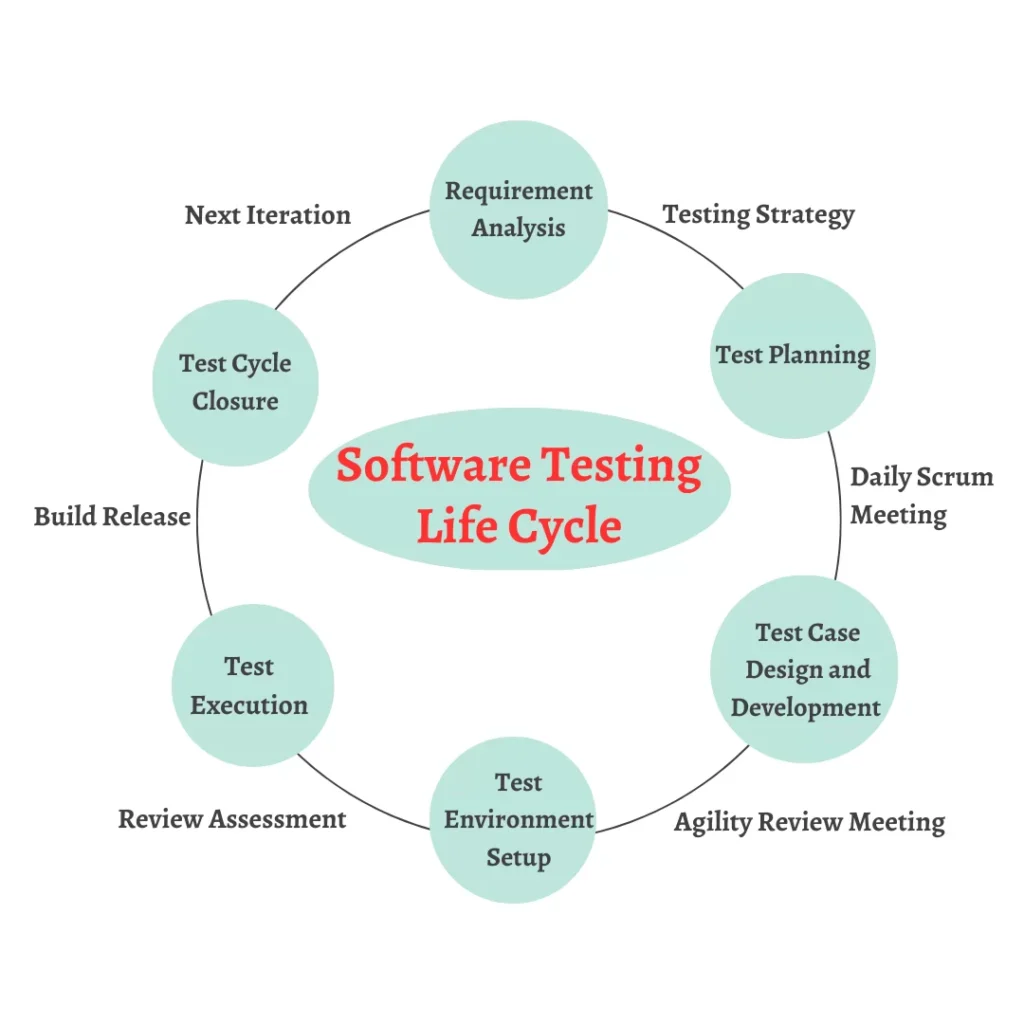
Just like software development has a lifecycle (SDLC), software testing follows its own structured process known as the Software Testing Life Cycle (STLC). This framework ensures that testing activities are carried out in a systematic and planned manner. The STLC consists of a series of distinct phases, each with its own goals and deliverables. Understanding this cycle is a cornerstone of software testing basics. The phases typically include:
- Requirement Analysis: In this initial phase, the testing team studies the software requirements from a testing perspective. They identify testable requirements and clarify any ambiguities with stakeholders.
- Test Planning: Here, the test lead or manager creates the test plan document. This strategy document outlines the scope, objectives, resources, schedule, and deliverables of the testing effort.
- Test Case Development: The testing team designs and writes detailed test cases based on the requirements. A test case includes steps, data, and the expected result for a specific test scenario.
- Test Environment Setup: This phase involves setting up the software, hardware, and network configurations needed to execute the test cases. This environment should mimic the final production environment as closely as possible.
- Test Execution: The testers execute the prepared test cases in the test environment. They compare the actual results with the expected results and log any discrepancies as defects or bugs.
- Test Cycle Closure: In the final phase, the team prepares test closure reports, which summarize the entire testing process. This includes metrics on test coverage, defects found, and the overall quality of the software, helping decide if the application is ready for release.
An Introduction to Black-Box, White-Box, and Grey-Box Testing
When testers approach an application, they can do so with different levels of knowledge about its internal workings. These approaches are categorized as black-box, white-box, and grey-box testing.
Black-Box Testing
In black-box testing, the tester has no knowledge of the internal code structure, logic, or implementation details of the software. The application is treated as a “black box.” The tester focuses solely on the inputs and outputs, verifying that the software meets its functional requirements from a user’s perspective. This is one of the most common methods covered in software testing basics because it aligns with how an end-user interacts with the product. Techniques used in black-box testing include equivalence partitioning (dividing input data into equivalent classes) and boundary value analysis (testing at the boundaries of those classes). For example, if a field accepts numbers from 1 to 100, testers would check values like 0, 1, 100, and 101.
White-Box Testing
White-box testing is the complete opposite. The tester has full access to and knowledge of the source code and internal structure of the application. This method is also known as clear-box or glass-box testing. It is typically performed by developers who want to ensure that the internal logic and pathways of their code are working correctly. The goal is to verify the flow of inputs and outputs through the application and to improve design and usability. Techniques include statement coverage (ensuring every line of code is executed) and branch coverage (ensuring every possible path of a decision point is tested). This level of testing helps in finding hidden errors and optimizing the code for better performance.
Grey-Box Testing
As the name suggests, grey-box testing is a hybrid of black-box and white-box testing. The tester has partial knowledge of the system’s internal workings. They might have access to design documents or the database structure, which allows them to design more intelligent test cases. However, they do not have access to the source code itself. This approach combines the user-focused perspective of black-box testing with the code-targeted approach of white-box testing. It allows for more in-depth testing without requiring the tester to be an expert in the programming language used. For instance, a grey-box tester might use their knowledge of the database to create specific input data that targets a potential database error.
Conclusion: The Foundation of Quality Software
Mastering the fundamentals of software testing is no longer a niche skill reserved for developers; it’s a core component of creating successful digital products. From ensuring an e-commerce checkout works flawlessly to protecting a banking app from security threats, testing is the silent guardian of our digital lives.
We’ve explored the core concepts, from the different levels like unit and system testing to the main approaches like manual and automated testing. We also touched upon the structured process of the STLC and different perspectives like black-box and white-box testing. As technology continues to evolve, the principles of quality assurance remain more important than ever. For those looking for trends and insights in this space, resources like https://siliconvalleytime.co.uk/ offer valuable perspectives on the tech industry.
Ultimately, understanding software testing basics provides a new appreciation for the stable, reliable software we use daily. It’s a field dedicated to improving quality, enhancing user satisfaction, and building trust between a company and its customers. Each bug found and fixed before release is a potential frustration, security risk, or financial loss that has been prevented. The discipline of software testing is a complex and fascinating field, and you can learn much more about its history and methodologies by exploring resources such as the comprehensive overview available on Wikipedia. It is the commitment to this process that separates great software from the rest.
Frequently Asked Questions (FAQ)
Q1: What is the main purpose of software testing?
The main purpose is to identify defects, bugs, or errors in a software application to ensure it meets the specified requirements, works as expected, and provides a good user experience before it is released to the public.
Q2: Can software ever be 100% bug-free?
No, it is practically impossible to create software that is 100% free of bugs. The goal of testing is not to find every single bug but to find and fix the most critical ones, reducing the risk of failure to an acceptable level before release.
Q3: Who performs software testing?
Software testing is performed by various people, including specialized Software Quality Assurance (QA) Engineers or Testers, Software Developers (especially for unit testing), and sometimes end-users or clients (during Acceptance Testing).
Q4: What is the difference between a bug and a defect?
In the context of software testing basics, the terms “bug” and “defect” are often used interchangeably. Both refer to a flaw or error in the software that causes it to produce an incorrect or unexpected result, or to behave in unintended ways.
Q5: Is manual testing still relevant with the rise of automation?
Absolutely. While automation is excellent for repetitive, large-scale tests, manual testing is crucial for exploratory testing, usability testing, and ad-hoc testing. It brings a human perspective, creativity, and intuition that automated scripts cannot replicate, making it an irreplaceable part of a balanced testing strategy.




