
Have you ever felt that strange sensation of someone looking over your shoulder while you’re on your phone? Whether you’re commuting on a busy train, waiting in line for coffee, or just sitting in a public park, our screens are often on full display. From personal messages and banking details to confidential work emails, a quick glance from a stranger can expose sensitive information.
This is where a privacy screen protector comes in. It’s a simple yet powerful tool that acts like a digital bodyguard for your device, keeping your personal data for your eyes only. This guide will walk you through everything you need to know about this essential accessory, helping you understand how it works, why you need one, and how to choose the perfect fit for your digital life.
Key Takeaways
- A privacy screen protector uses micro-louver technology to limit the viewing angle of your screen, making it appear black to anyone not directly in front of it.
- These protectors offer dual benefits: safeguarding your digital privacy from prying eyes and protecting your screen from physical damage like scratches and cracks.
- There are different types available, including tempered glass and film, each with unique advantages in terms of feel, durability, and clarity.
- When choosing one, consider factors like material, viewing angle, brand reputation, and compatibility with your specific device model.
- While highly effective for privacy, they can slightly dim the screen and may not be ideal for sharing content with others.
What Exactly Is a Privacy Screen Protector?
At its core, a privacy screen protector is an accessory you apply to the screen of your smartphone, tablet, or laptop. On the surface, it looks much like a standard screen protector designed to prevent scratches and cracks. However, it contains a special film that controls how light is transmitted from your screen. This film is engineered with a technology called micro-louver. Think of it as a microscopic set of vertical blinds layered onto your screen. When you look at your device head-on, you can see everything clearly because the “blinds” are open to your direct line of sight.
However, for someone sitting next to you trying to sneak a peek, the view is completely different. From an angle, those tiny louvers block the light from the screen, making it appear dark or completely black. This effectively creates a private viewing cone, usually about 60 degrees wide (30 degrees on each side of the center). Anyone outside this cone sees nothing. This simple yet brilliant technology ensures that your sensitive information remains confidential, whether you’re answering a personal text, reviewing a work document, or checking your bank account balance in public. It’s an essential layer of defense in an increasingly connected world.
How Does Micro-Louver Technology Work?
The magic behind every privacy screen protector is a technology known as micro-louver. This technology is inspired by the simple design of window blinds but shrunken down to a microscopic scale. The protector is embedded with thousands of tiny, angled slats or “louvers.” These louvers are positioned in a precise, parallel pattern across the film. They are so small that they are completely invisible to the naked eye when you are looking directly at the screen. Their job is to control the direction in which light from your device’s display can travel.
When you are positioned directly in front of the screen, your line of sight aligns perfectly with the openings between the louvers. This allows the screen’s light to pass through unobstructed, giving you a crystal-clear view of your content. However, when someone tries to look at your screen from the side, their viewing angle is oblique. At this angle, the louvers physically block the light’s path, acting like a solid wall. The screen appears dark and unreadable to them. The effectiveness of a privacy screen protector is often measured by its viewing angle. A narrower angle provides more privacy but requires you to be more directly in front of your screen to see it properly.
The Science of Light and Angles
Understanding how a privacy screen protector works is all about the physics of light. Your phone’s screen emits light in all directions. A standard screen protector doesn’t interfere with this. A privacy protector, however, acts as a filter. The micro-louvers are specifically designed to only let light pass through at a perpendicular angle.
- Direct Viewing (0 degrees): Light travels straight to your eyes. You see a clear, bright image.
- Side Viewing (30-45 degrees): The louvers begin to obstruct the light path. The screen appears dimmed and distorted.
- Extreme Side Viewing (60+ degrees): The louvers completely block the light. The screen looks black.
This targeted light filtering is what gives you “visual security.” It’s a passive system, meaning it’s always working without needing any power or activation. It’s a physical barrier against visual hacking, providing peace of mind wherever you use your device.
The Dual Benefits: Privacy and Protection
While the primary selling point is confidentiality, it’s crucial to remember that a privacy screen protector offers a fantastic two-for-one deal. It doesn’t just guard your data; it also physically guards your expensive device screen. Screens are one of the most vulnerable and costly components of any smartphone or tablet. A single accidental drop can lead to a spiderweb of cracks and a hefty repair bill. These protectors add a durable layer that can absorb impact and resist damage.
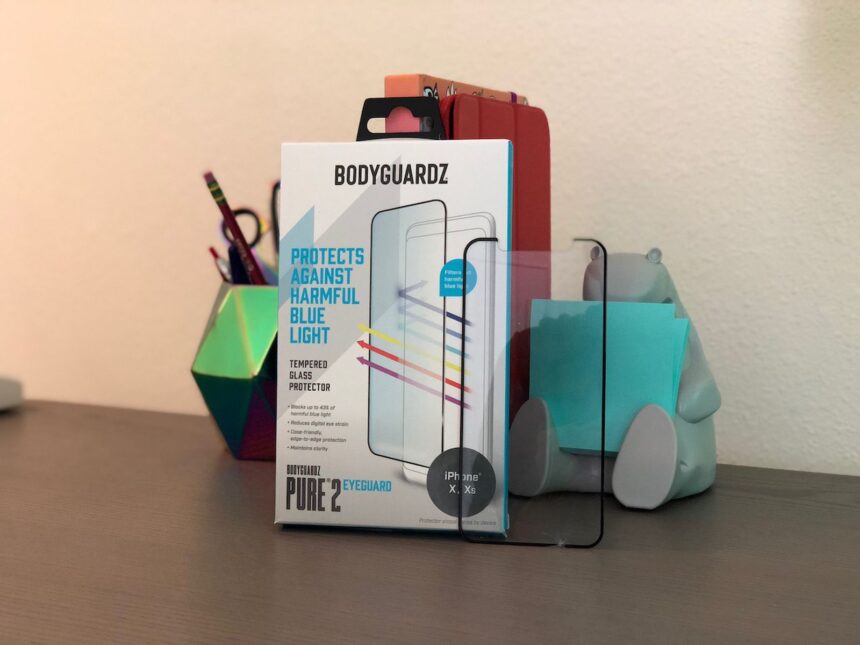
Most high-quality privacy protectors are made from tempered glass, which is significantly stronger than the standard plastic film protectors. Tempered glass is designed to shatter in a safe, web-like pattern upon severe impact, absorbing the force that would otherwise crack your actual screen. They also feature a hardness rating, typically 9H,
which means they are highly resistant to scratches from everyday objects like keys, coins, and sand. This ensures your screen stays in pristine condition, preserving the resale value of your device and keeping your viewing experience free of distracting marks. Therefore, when you invest in a privacy screen protector, you are making a smart decision to protect both your digital life and your physical device.
Different Types of Privacy Screen Protectors
Not all privacy protectors are created equal. They primarily come in two material types: tempered glass and plastic film. Each has its own set of characteristics, and the right choice for you depends on your priorities—be it feel, durability, or cost.
Tempered Glass Protectors
Tempered glass is the most popular and recommended option for a privacy screen protector. It is created by heating glass and then cooling it rapidly, a process that makes it much stronger than regular glass. It offers a superior feel, closely mimicking the smooth, responsive surface of your phone’s original screen. Swiping and tapping feel natural and effortless.
In terms of protection, tempered glass is the clear winner. Its high hardness rating (usually 9H) makes it extremely resistant to scratches and shattering. It provides robust protection against drops and impacts, often sacrificing itself to save the actual screen underneath. The clarity is generally excellent when viewed head-on, although the privacy filter will naturally cause some dimming.
PET/TPU Film Protectors
Plastic film protectors, typically made from Polyethylene Terephthalate (PET) or Thermoplastic Polyurethane (TPU), are the other main category. These are thinner, more flexible, and generally more affordable than their glass counterparts. PET films are more rigid and offer basic scratch resistance but provide minimal impact protection.
TPU films are softer and more flexible, offering a unique “self-healing” property where minor scuffs and scratches can disappear over time. While film protectors are great for preventing surface-level blemishes, they don’t offer the same level of drop protection as tempered glass. Some users also find that the plastic texture doesn’t feel as premium as glass. However, they are a solid, budget-friendly choice if your main concern is privacy and light scratch prevention.
|
Feature |
Tempered Glass Protector |
Film (PET/TPU) Protector |
|---|---|---|
|
Feel |
Smooth, like the original screen |
Can feel slightly rubbery or plastic-like |
|
Protection |
Excellent against drops and scratches |
Good against scratches, minimal drop protection |
|
Thickness |
Thicker, more substantial |
Very thin and flexible |
|
Cost |
More expensive |
More affordable |
|
Installation |
Easier to install without bubbles |
Can be tricky to apply perfectly |
Why You Need a Privacy Screen Protector Today
In our hyper-connected world, the need for digital privacy has never been more acute. We conduct so much of our lives through our handheld devices, often in crowded public spaces. Without a privacy screen protector, you are unknowingly broadcasting your personal and professional information to anyone within eyeshot. This is a practice known as “visual hacking” or “shoulder surfing,” and it’s a low-tech but highly effective way for thieves to steal sensitive data.
Consider your daily routine. On your morning commute, you might be responding to a confidential work email. While in line at a café, you could be checking your bank balance or approving a transaction. At the airport, you might be booking a hotel with your credit card details. In each of these scenarios, a curious or malicious onlooker could easily capture your login credentials, financial information, private conversations, or proprietary company data.
The consequences can range from personal embarrassment to significant financial loss or corporate espionage. A privacy screen protector is a simple, affordable, and proactive measure to mitigate these risks. It creates an invisible shield that allows you to use your device with confidence, knowing your screen is your own private space.
Choosing the Right Privacy Screen Protector for Your Device
Selecting the perfect privacy screen protector involves more than just matching it to your phone model. Several key factors can influence its performance, durability, and your overall user experience. Taking a moment to consider these aspects will ensure you get a product that meets your specific needs and provides reliable protection. A great place to start your search for tech accessories and insights is by checking out resources like those found at https://siliconvalleytime.co.uk/, which often cover the latest trends in device protection.
Material: Glass vs. Film
As discussed, your first major decision is the material. Do you prefer the superior feel and robust impact protection of tempered glass, or the thin, flexible, and budget-friendly nature of a TPU film? For most users, tempered glass is the recommended choice. It offers the best all-around defense and a more premium user experience that feels just like your phone’s native screen. If you have a curved-edge display, a flexible TPU film might offer better edge-to-edge coverage, but it won’t be as protective against drops.
Viewing Angle: 60 vs. 90 Degrees
The viewing angle determines how private your screen really is. Most privacy protectors offer a 60-degree viewing cone (30 degrees to each side). This is the standard and provides a good balance between privacy and usability. Some protectors offer a wider 90-degree angle, which is less private but makes it slightly easier to share your screen when you want to. Conversely, some high-security versions may have an even narrower angle. A narrower angle means greater security from prying eyes, but it also means you have to be more perfectly aligned with your screen to see it clearly, which can be inconvenient at times.
Brand and Reviews
Not all protectors are made with the same quality standards. It’s wise to choose a privacy screen protector from a reputable brand known for quality materials and precise manufacturing. Before buying, spend a few minutes reading customer reviews on retail websites. Pay attention to comments about ease of installation, bubble formation, clarity, touch sensitivity, and durability over time.
Real-world feedback is invaluable for spotting potential issues that aren’t mentioned in the product description. Look for brands that offer installation kits with alignment frames, cleaning wipes, and dust removal stickers, as these make the application process much smoother.
Installation Tips for a Bubble-Free Finish
Applying a privacy screen protector can seem daunting, but with a little patience and the right technique, you can achieve a perfect, bubble-free application. A clean installation not only looks better but also ensures proper adhesion and touch sensitivity.
Follow these steps for a flawless finish:
- Prepare Your Space: Work in a clean, well-lit, and dust-free environment. A steamy bathroom is a great spot, as the humidity helps reduce airborne dust particles.
- Wash Your Hands: Thoroughly wash and dry your hands to remove any oils or dirt that could leave fingerprints on the protector’s adhesive side.
- Clean the Screen: Use the included alcohol wipe to thoroughly clean your device’s screen, removing all smudges, oils, and fingerprints. Then, use the microfiber cloth to dry it completely.
- Remove Dust: This is the most critical step. Use the dust-removal sticker to dab the entire surface of the screen. Even tiny, invisible dust specks can cause bubbles. Hold the screen up to a light source to ensure it’s perfectly clean.
- Align the Protector: Many kits come with an alignment frame. If yours does, snap it onto your phone. If not, carefully align the protector with the edges, speaker cutout, and camera of your device before peeling off the adhesive backing.
- Apply the Protector: Peel the protective film from the adhesive side of the privacy screen protector. Carefully place it onto your screen, starting from one end and letting it slowly adhere to the surface.
- Remove Bubbles: If any bubbles appear, use a credit card or the included squeegee to gently push them toward the nearest edge. For stubborn bubbles, you can carefully lift the corner of the protector nearest to the bubble and re-apply it while pushing the air out.
Potential Downsides to Consider
While a privacy screen protector is an incredibly useful accessory, it’s important to be aware of a few potential drawbacks. These are generally minor trade-offs for the security you gain. The most noticeable effect is a reduction in screen brightness. Because the micro-louver film is designed to block light, it will inevitably dim your display slightly, even when viewed head-on. You may need to increase your screen’s brightness level to compensate, which can lead to a minor increase in battery consumption over time.
Another consideration is the impact on viewing with others. The very feature that makes it great for privacy—the limited viewing angle—makes it difficult to share content. If you often show photos, videos, or presentations to friends or colleagues on your phone, you will have to hold the device directly in front of them, which can be awkward. Finally, some lower-quality protectors can slightly reduce touch sensitivity or interfere with in-screen fingerprint scanners. This is why it is crucial to choose a high-quality product from a trusted brand that is specifically designed and tested for compatibility with your device model’s features.
Conclusion
In a world where our digital and physical lives are increasingly intertwined, protecting our personal information is not a luxury—it’s a necessity. A privacy screen protector is one of the simplest, most effective, and affordable tools you can use to defend against visual hacking and shoulder surfing.
It offers the powerful dual advantage of safeguarding your sensitive on-screen data while also providing a robust physical shield against the scratches, scuffs, and drops of daily life. By understanding how the technology works, what types are available, and how to choose the right one for your needs, you can browse, text, and bank with confidence, no matter where you are. It’s a small investment that delivers significant peace of mind, transforming your screen into a private vault for your eyes only.
Frequently Asked Questions (FAQ)
Q1: Will a privacy screen protector affect my phone’s touch sensitivity?
A well-made privacy screen protector from a reputable brand should not noticeably affect touch sensitivity. High-quality tempered glass protectors are designed to be ultra-thin and highly conductive, ensuring that your taps, swipes, and gestures are registered accurately. If you experience issues, it’s often due to a poor-quality product or improper installation.
Q2: Can I still use Face ID or an in-screen fingerprint scanner?
Most modern privacy protectors are designed to be fully compatible with facial recognition systems like Face ID, as they have precise cutouts for the cameras and sensors. However, compatibility with in-screen fingerprint scanners can be hit-or-miss. The extra layer can sometimes interfere with ultrasonic or optical sensors. It’s essential to look for a protector that is explicitly advertised as being compatible with your phone’s specific biometric scanner.
Q3: How much dimmer will my screen get?
The level of dimming varies by brand and quality, but you should expect a slight reduction in brightness. Most users find they can easily compensate by increasing their screen’s brightness setting by about 10-15%. While this does use slightly more battery, most people find the trade-off for complete privacy to be well worth it.
Q4: Is a privacy screen protector worth the extra cost over a regular one?
If you frequently use your device in public places like on public transport, in coffee shops, or in open-plan offices, then a privacy screen protector is absolutely worth the extra cost. The price difference is often minimal, yet the added benefit of securing your personal and professional data from prying eyes is immense. It’s an investment in both your device’s physical safety and your digital security.
Q5: Are these protectors difficult to remove?
No, they are designed to be removed without damaging your screen. To remove a tempered glass protector, you can gently slide a fingernail or a thin plastic card under one corner to lift it. Once you have a corner lifted, you can slowly and carefully peel the rest of the protector off the screen. It should come off in one piece and will not leave any sticky residue.