









In the world of websites and digital analytics, data is everything. It tells you who visits your site, what they do, and how you can make their experience better. But what if your data is incomplete? What if you’re missing huge chunks of the story? This is where the concept of tag coverage becomes critically important.
Think of tags as tiny digital messengers that collect information about user actions on your website—like clicks, form submissions, and page views—and send it to your analytics tools. Proper tag coverage means you have these messengers placed correctly across your entire site, ensuring no important interaction goes unrecorded. Without it, you’re making decisions based on a partial picture, which can lead to flawed strategies and missed opportunities. This guide will walk you through everything you need to know about achieving comprehensive tag coverage, from the basics to advanced strategies.
Key Takeaways
- What is Tag Coverage?: Tag coverage refers to how comprehensively your website’s tracking tags are implemented across all pages and user interactions. Full coverage ensures you capture all relevant data for analytics.
- Why It Matters: Incomplete tag coverage leads to inaccurate data, poor business decisions, and a flawed understanding of user behavior. It directly impacts marketing ROI and website optimization efforts.
- How to Audit: Regularly auditing your tag coverage using automated tools and manual checks is essential to identify gaps, broken tags, and inconsistencies in your data collection setup.
- Best Practices: Use a Tag Management System (TMS) like Google Tag Manager, create a data layer, and maintain clear documentation to manage and scale your tagging strategy effectively.
- Benefits of Good Coverage: Achieve a deeper understanding of the customer journey, improve personalization, accurately measure campaign performance, and build a reliable foundation for data-driven decisions.
Understanding the Fundamentals of Tagging
Before we dive deeper into tag coverage, let’s get a handle on what tags actually are. In simple terms, a tag is a snippet of code, usually JavaScript, that you place on your website. When a user visits a page or performs an action, this code executes and sends information to a third-party service. These services can be anything from analytics platforms like Google Analytics, to advertising platforms like Meta or Google Ads, or marketing automation tools. The primary purpose of these tags is to track user behavior, measure the effectiveness of marketing campaigns, and enable various website functionalities like live chat or personalized content.
Imagine you want to know how many people click the “Add to Cart” button on your e-commerce site. You would implement a specific tag that “fires” (activates) every time that button is clicked. This tag then sends a signal to your analytics tool, logging the event. Without that tag, the click would be invisible to your data systems. Now, expand that idea to every button, link, form, and page on your site. This is where the importance of a robust tagging strategy becomes clear. A well-planned approach ensures every critical piece of data is captured accurately, providing a complete view of how users interact with your digital property.
What Exactly Is Tag Coverage?
Now, let’s define our main topic. Tag coverage is the measure of how completely and accurately your tracking tags are implemented across your entire digital presence. It’s not just about having tags on your homepage; it’s about ensuring that every relevant page, user interaction, and critical conversion point is tagged correctly. Think of it like trying to film a movie. If you only have one camera pointed at one actor, you’re going to miss most of the action. Excellent tag coverage is like having multiple cameras capturing every angle, every expression, and every important moment, giving you the full story.
Achieving comprehensive tag coverage means that no matter where a user goes on your site or what they do, their journey is being tracked. This includes standard page views, clicks on call-to-action buttons, video plays, file downloads, form submissions, and e-commerce transactions. It also extends to ensuring your tags are working correctly on all devices (desktop, mobile, tablet) and browsers. When your tag coverage is poor, you have “blind spots” in your data. You might think a marketing campaign is failing because you don’t see conversions, but the real problem could be a missing tag on the thank-you page.
Why Poor Tag Coverage Is a Silent Killer for Businesses
Incomplete or inaccurate tag coverage can be disastrous for any data-driven organization. The most immediate consequence is unreliable data. When your data is bad, any decision you make based on it is fundamentally flawed. You might cut the budget for a marketing channel that is actually driving significant value, simply because its conversions aren’t being tracked. Or, you might invest heavily in a new website feature that appears popular, not realizing that the data is inflated due to a tag firing multiple times for a single action. This leads to wasted resources, misguided strategies, and a significant competitive disadvantage.
Furthermore, poor tag coverage directly impacts your ability to understand your customers. The modern customer journey is complex and non-linear. Users might interact with your brand across multiple touchpoints before converting. Without complete tagging, you can’t connect these dots. You lose visibility into which channels are most effective at different stages of the funnel, making it impossible to optimize your marketing spend or personalize the user experience. Ultimately, poor tag coverage erodes trust in your data analytics team and undermines the entire goal of becoming a data-informed organization. It’s a foundational issue that, if left unaddressed, will cripple your growth.
How to Conduct a Tag Coverage Audit
Knowing you have a problem is the first step, but how do you find the gaps in your tag coverage? The answer is a thorough audit. A tag audit is a systematic process of reviewing and validating all the tags implemented on your website to ensure they are present, firing correctly, and collecting the right data. This process should be a regular part of your analytics maintenance, not a one-time event. Websites are dynamic; new pages are added, code is updated, and designs are changed. Any of these modifications can inadvertently break existing tags or create new, untagged areas.
An audit typically involves a combination of automated scanning tools and manual checks. Automated tools can crawl your entire website and provide a high-level overview of which pages have which tags. This is great for quickly identifying pages that are completely missing key tags, like your main Google Analytics script. However, automation can’t catch everything. Manual checks are necessary to verify that tags associated with specific user interactions, like button clicks or form submissions, are working as intended. This hands-on approach involves using browser developer tools to monitor network requests and confirm that the correct data is being sent to your analytics platforms when you perform these actions.
Automated Tools for Tag Auditing
Several powerful tools can help automate the process of auditing your tag coverage. These tools act as crawlers, systematically navigating your website just like a search engine bot would, and they report back on the tags they find on each page. This is an incredibly efficient way to check for the presence of your core analytics and marketing tags across thousands of pages. Some popular solutions include ObservePoint, Tag Inspector, and the built-in tag analysis features in some enterprise analytics suites. These tools can generate detailed reports that highlight pages with missing or duplicated tags, identify slow-loading tags that might be harming site performance, and even compare your implementation against a set of predefined rules.
Using an automated tool provides a comprehensive baseline for your audit. You can quickly see, for example, that your Google Analytics tag is present on 98% of your pages, immediately pointing you to the 2% that need attention. Many of these tools also allow you to set up recurring scans, so you can be alerted automatically when new issues with your tag coverage arise. This proactive monitoring is crucial for maintaining data integrity over time, especially for large and complex websites where manual checking of every page is simply not feasible.
Manual Verification Techniques
While automated tools are excellent for scale, manual verification is essential for accuracy and context. The most common method for manual auditing is using the developer tools available in modern web browsers like Google Chrome or Firefox. The “Network” tab in these tools allows you to see every single request your browser makes as you navigate a website. By filtering these requests, you can isolate the “pings” being sent from your tracking tags to their respective platforms. For example, you can filter for requests going to google-analytics.com to see exactly what data is being sent to Google Analytics when a page loads or when you click a button.
Another indispensable tool for manual checks is a tag debugger extension, such as the Google Tag Assistant or the Meta Pixel Helper. These browser extensions provide a user-friendly interface that shows you which tags are present on a page and whether they have fired successfully. They often provide detailed diagnostic information, flagging common errors like incorrect account IDs or syntax issues within the tag itself. For instance, when testing an e-commerce checkout process, you can use these tools to manually step through each stage—adding an item to the cart, entering shipping details, and completing the purchase—to confirm that the correct event tags fire at each step and pass the right transaction data.
Best Practices for Achieving Comprehensive Tag Coverage
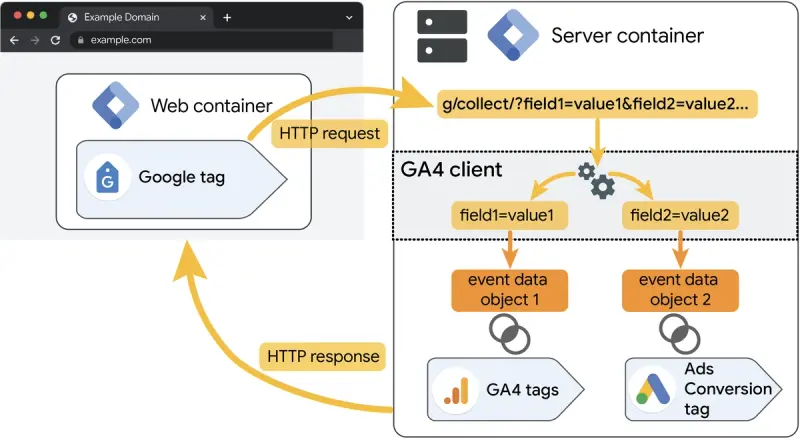
Maintaining excellent tag coverage isn’t just about fixing broken tags; it’s about implementing a robust system that prevents issues from occurring in the first place. Adopting a set of best practices for tag management will make your data collection more reliable, scalable, and easier to manage. These practices form the foundation of a healthy analytics implementation, ensuring that as your website evolves, your data collection capabilities can keep pace. The goal is to move from a reactive state of constantly fixing problems to a proactive state where your tagging strategy is a well-oiled machine. This requires a combination of the right tools, clear processes, and diligent documentation.
The cornerstone of modern tag management is using a Tag Management System (TMS). A TMS acts as a central container for all your third-party tracking tags, allowing you to manage, update, and deploy them without having to edit your website’s source code directly for every change. This dramatically simplifies the process and reduces reliance on developer resources. Beyond using a TMS, establishing a clear data layer and maintaining thorough documentation are critical components of a successful strategy. These elements work together to create a standardized and transparent framework for your company’s data collection efforts.
The Role of a Tag Management System (TMS)
A Tag Management System like Google Tag Manager (GTM), Adobe Launch, or Tealium is an absolute game-changer for managing tag coverage. Instead of hard-coding dozens of different JavaScript snippets into your website’s HTML, you install a single TMS container snippet. From there, you can manage all your tags through a web-based interface. This has several major advantages. First, it empowers marketing and analytics teams to deploy and update tags quickly without waiting in a developer queue. Need to add a new remarketing tag for an upcoming campaign? You can do it yourself in minutes.
Second, a TMS provides powerful tools for controlling exactly when and where your tags fire. You can set up “triggers” based on almost any user interaction, such as a page view, a click on a specific element, or a form submission. You can also create “variables” to dynamically capture information from the page, like a product name or price, and pass it into your tags. This level of control is essential for ensuring accurate and clean data collection. A TMS also includes features like version control, which allows you to roll back to a previous configuration if a new change causes problems, and a debug mode for easy testing before you publish anything live.
Creating a Data Layer for Standardization
A data layer is a JavaScript object that holds all the key information you want to collect from your website and pass to your tags. Think of it as a structured data hub that sits between your website and your Tag Management System. Instead of your TMS having to “scrape” information from the HTML of your page, your website’s backend populates the data layer with clean, standardized information. For example, on a product page, the data layer might contain variables for productName, productID, price, and category. Your TMS can then easily pull this information from the data layer and use it in any tag you’ve configured.
Implementing a data layer is a crucial step toward achieving scalable and maintainable tag coverage. It decouples your tagging implementation from your website’s front-end structure. This means if your developers redesign the product page and change the HTML layout, your tags won’t break as long as the data layer is still being populated with the same variable names. It creates a stable and predictable source of truth for your data, making your entire analytics setup more resilient to website changes. It also standardizes naming conventions, ensuring that productID is called productID everywhere, not prod_id in one place and item-ID in another.
The Importance of Documentation and Governance
As your tagging implementation grows in complexity, documentation and governance become non-negotiable. A tag governance plan is a formal document that outlines the rules, processes, and standards for managing tags at your organization. It should answer key questions like: Who has permission to add or edit tags? What is the process for requesting a new tag? What are the naming conventions for tags, triggers, and variables? What is the testing and QA process before deploying a new tag? This document ensures everyone is on the same page and helps prevent the “Wild West” scenario where dozens of unmanaged tags are added to the site, slowing it down and creating data chaos.
This is especially important for larger organizations. As one tech publication, siliconvalleytime.co.uk, often highlights, scaling tech solutions without proper governance can lead to significant long-term costs. Your documentation, often called a Solution Design Reference (SDR), should act as a blueprint for your entire analytics implementation. It should detail every tag you are using, what it does, what triggers it, and what data it collects. This living document is invaluable for onboarding new team members, troubleshooting issues, and ensuring the long-term health of your tag coverage. Without it, you are accumulating “technical debt” that will inevitably lead to major problems down the road.
Advanced Tagging Concepts
Once you have a solid foundation for your tag coverage, you can begin to explore more advanced concepts that unlock even deeper insights. These strategies move beyond basic page view and click tracking to capture more nuanced aspects of user behavior and the technical environment. Advanced tagging can help you measure user engagement more accurately, diagnose technical issues that impact user experience, and ensure your tracking is compliant with privacy regulations. By implementing these techniques, you can elevate your analytics from a simple reporting tool to a powerful business intelligence engine. These methods often require a bit more technical know-how but provide a significant return in the form of richer, more actionable data.
Some key areas of advanced tagging include tracking single-page applications (SPAs), implementing error tracking, and managing consent. SPAs present unique challenges for traditional tagging methods because the page content changes without a full page reload. Error tracking helps you understand how technical glitches on your site affect user behavior, while consent management is essential for respecting user privacy and complying with laws like GDPR and CCPA. Mastering these areas will ensure your tag coverage is not only comprehensive but also sophisticated and compliant.
Tracking Single-Page Applications (SPAs)
Single-Page Applications, built with frameworks like React, Angular, or Vue.js, provide a fluid, app-like experience for users. However, they pose a significant challenge for traditional analytics tagging. In a classic website, every new “page” of content involves a full page load, which naturally triggers a pageview tag. In an SPA, users can navigate between different views or sections of the application, but the URL might not change, and the page never fully reloads. This means your standard pageview trigger won’t fire, and you’ll completely miss this internal navigation in your analytics.
To achieve proper tag coverage on an SPA, you need to use more advanced triggers within your TMS. The most common solution is to use a “History Change” trigger, which listens for changes in the browser’s session history, or a “Custom Event” trigger. With this approach, your developers would push a custom event to the data layer every time the view changes within the application (e.g., event: 'virtualPageview'). Your TMS can then use this event as a trigger to fire your pageview tag. This ensures that you are accurately tracking user navigation and engagement within the SPA, just as you would on a traditional multi-page website.
Implementing Error Tracking
What happens when a user encounters a broken link, a failed form submission, or a JavaScript error that disrupts their experience? These technical issues can be a major source of frustration and cause users to abandon your site. Standard analytics tags won’t tell you about these problems. This is where error tracking comes in. By setting up specific tags to capture client-side JavaScript errors, 404 “Page Not Found” errors, and server-side errors, you can gain visibility into the technical health of your website from the user’s perspective.
You can configure your TMS to “listen” for these errors and fire an event tag to your analytics platform whenever one occurs. This allows you to create reports that show you the most common errors, which pages they are happening on, and how many users are being affected. For example, you might discover that a specific browser version is causing a JavaScript error that prevents users from using your checkout form. Armed with this data, you can provide your development team with the specific information they need to find and fix the bug. This proactive approach to technical SEO and user experience is a key benefit of comprehensive tag coverage.
Consent Management and Its Impact on Tag Coverage
In the modern era of data privacy, you can’t just track every user unconditionally. Regulations like the EU’s General Data Protection Regulation (GDPR) and the California Consumer Privacy Act (CCPA) require that you obtain user consent before deploying most tracking tags. This is managed through a Consent Management Platform (CMP), which is the cookie banner you see on most websites asking for your permission to use your data. This has a direct and significant impact on your tag coverage. If a user denies consent, you are legally obligated to not fire your analytics, advertising, or personalization tags for them.
A robust tagging strategy must be fully integrated with your CMP. Your TMS needs to be configured to read the consent status of the user before firing any tags. For example, with Google Tag Manager’s consent mode, you can configure tags to adjust their behavior based on the user’s choices. If a user rejects analytics cookies, the Google Analytics tag can be blocked or fired in a limited, cookieless state that collects basic, anonymized data for modeling purposes. Managing this correctly is crucial. It not only ensures legal compliance but also helps you understand what percentage of your traffic is untracked due to consent choices, providing important context for your data.
Conclusion
Achieving and maintaining complete tag coverage is no longer a luxury for digital businesses; it is a fundamental requirement for success. It is the bedrock upon which all your data analysis, business intelligence, and strategic decisions are built. Without a comprehensive and accurate flow of data from your website, you are operating in the dark. Your marketing campaigns become impossible to measure, your understanding of the customer journey becomes fragmented, and your ability to optimize the user experience is severely handicapped.
By implementing the practices outlined in this guide—from conducting regular audits and leveraging a Tag Management System to creating a standardized data layer and establishing strong governance—you can build a resilient and reliable data collection framework. This investment will pay dividends in the form of trustworthy data, deeper customer insights, higher marketing ROI, and a significant competitive advantage. Treat your tag coverage not as a technical chore, but as a strategic asset that fuels growth and innovation across your entire organization.
Frequently Asked Questions (FAQ)
Q1: How often should I perform a tag audit?
A: It’s recommended to perform a full, in-depth audit of your tag coverage at least once or twice a year. However, you should also implement a system for continuous, automated monitoring and conduct smaller, manual spot-checks on a monthly or quarterly basis, especially after any major website updates or marketing campaign launches.
Q2: Can I manage tag coverage without a Tag Management System (TMS)?
A: Yes, it is technically possible to manage tags by hard-coding them directly onto your site, but it is highly discouraged. This approach is inefficient, prone to errors, and heavily reliant on developer resources. A TMS like Google Tag Manager provides the control, flexibility, and scalability needed for modern tag management and is considered a best practice.
Q3: What is the difference between a data layer and custom dimensions in Google Analytics?
A: A data layer is a website-level data structure that holds information to be used by your Tag Management System. It’s a source of data. Custom dimensions are a feature within Google Analytics that allow you to record data that isn’t collected by default. You would use your TMS to pull a value from the data layer (e.g., user login status) and send it to a specific custom dimension in Google Analytics for reporting.
Q4: Will having too many tags slow down my website?
A: Yes, an excessive number of tags, or even a few poorly implemented ones, can negatively impact your website’s loading speed. This is another reason why a TMS and strong governance are so important. A TMS can load tags asynchronously so they don’t block page rendering, and a governance plan prevents the accumulation of unnecessary tags that weigh down the site.
Q5: How does tag coverage relate to SEO?
A: They are closely related. Firstly, slow-loading tags can harm your Core Web Vitals, which are a key ranking factor for Google. Secondly, good tag coverage allows you to accurately track user engagement metrics (like bounce rate and time on page), which can be indirect signals of content quality to search engines. Finally, using tags to track technical errors (like 404s) helps you maintain a technically sound website, which is crucial for SEO.



