








Have you ever tried to apply for a job online, clicked on a company’s “Careers” button, and been greeted by a confusing error message? It can be incredibly frustrating. One specific error that many users and IT administrators encounter is the message: keine karriere-subdomain gefunden. If you don’t speak German, this translates roughly to “no career subdomain found.” Even if you do speak the language, the technical reason behind it might still be a mystery.
This guide is designed to help you understand exactly what this error means. Whether you are a job seeker trying to submit an application or a website administrator trying to fix your company’s hiring portal, we have you covered. We will break down the technical jargon into simple terms, explore why subdomains fail, and offer practical solutions.
Key Takeaways
- Understanding the Error: The phrase keine karriere-subdomain gefunden usually indicates a disconnect between a main website and its recruitment portal.
- DNS Issues: Domain Name System (DNS) misconfigurations are the most common culprit.
- Software Configuration: HR software settings (like Rexx systems) often need specific subdomain adjustments.
- Browser Caching: Sometimes the issue is on the user’s end, involving browser cache or outdated links.
- Resolution: Fixing this requires a mix of IT troubleshooting, DNS propagation checks, and software verification.
What Does “Keine Karriere-Subdomain Gefunden” Actually Mean?
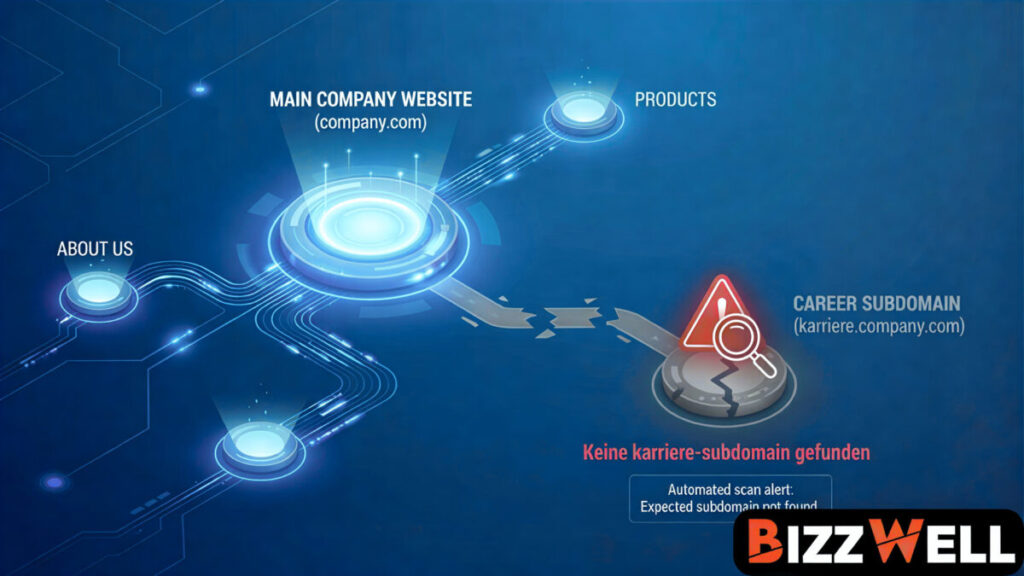
When you see the message keine karriere-subdomain gefunden, it is a specific server response. To understand it, we first need to understand what a subdomain is. A website is usually hosted at a primary domain, like example.com. A subdomain is a prefix added to that domain to separate different sections of the site, such as blog.example.com or, in this case, karriere.example.com (career.example.com).
Companies often use third-party software to manage their job listings. Instead of hosting these listings on their main server, they point a subdomain (like jobs.companyname.com) to the software provider’s servers. When you click that link, your browser asks the internet, “Where is this subdomain?” If the internet’s address book (DNS) cannot find it, or if the software provider doesn’t recognize the incoming request, the server returns the error: keine karriere-subdomain gefunden.
This error essentially says, “I see you are trying to reach a career page, but the specific address you are looking for doesn’t exist in my system.” It is a digital dead end. For a job seeker, it looks like a broken website. For a company, it means losing potential talent because no one can apply.
The Impact on User Experience
Imagine finding your dream job. You spend hours tailoring your resume and writing a cover letter. You are ready to hit “Apply,” but the link fails. This is a critical failure point. User experience is paramount in recruitment. If a candidate cannot access the portal, they might assume the position is filled or that the company is disorganized.
For businesses, this technical glitch translates to real-world losses. A broken career page essentially hangs a “Closed” sign on your recruitment door. Understanding the gravity of this error is the first step toward prioritizing its fix.
Common Causes of the Subdomain Error
Why does this happen? The internet is a complex web of connections, and a loose wire anywhere can cause a site to fail. The keine karriere-subdomain gefunden error is rarely caused by one single thing. It is usually a combination of factors involving domain settings and external service providers.
One major cause is a DNS Misconfiguration. The Domain Name System (DNS) acts like the phone book of the internet. If the “phone number” (IP address) listed for the career subdomain is wrong, or if the entry was accidentally deleted, the browser cannot connect. This often happens when companies migrate their websites to new hosting providers but forget to move the subdomain records.
Another common cause relates to expired SSL certificates. Modern browsers require websites to be secure (HTTPS). If the security certificate for the career subdomain has expired, the browser might block access or the server might refuse the connection, resulting in various error messages, including subdomain failures.
Third-Party Integration Failures
Many companies use Applicant Tracking Systems (ATS) or HR software suites. These platforms host the job board for the company. To make it look seamless, the company sets up a “CNAME” record that masks the software provider’s address with their own branding.
If the subscription to the HR software expires, or if the configuration on the software provider’s end is changed without updating the company’s DNS, the link breaks. The system looks for the customer’s specific portal but returns keine karriere-subdomain gefunden because the account is inactive or mislinked.
How DNS Propagation Affects Subdomains
You might fix a setting and still see the error. This is often due to DNS propagation. When you make a change to your domain settings, it doesn’t happen instantly across the entire world. It takes time for the new information to spread to all the servers globally.
Think of it like updating a phone book. If you change your number, the phone company knows immediately. But it takes time for the printed books to reach everyone’s house. In the digital world, this can take anywhere from a few minutes to 48 hours. During this window, some users might be able to access the site while others still see keine karriere-subdomain gefunden.
Checking Propagation Status
There are tools available online that allow you to check the status of your DNS records globally. If you are an administrator, these tools are vital. They show you if your new CNAME or A-record is visible in New York, London, Tokyo, and Sydney.
If you see red crosses on these tools, it means the update hasn’t reached that region yet. Patience is key here. However, if 48 hours have passed and the error persists, the issue is likely with the configuration itself, not just the propagation time.
|
Time Elapsed |
Expected Status |
Action Required |
|---|---|---|
|
0 – 1 Hour |
Error likely persists everywhere |
Wait patiently. |
|
1 – 4 Hours |
Some regions may see the site |
Clear local cache. |
|
24 Hours |
Most regions should work |
Check configuration if failing. |
|
48+ Hours |
Should be fully resolved |
Contact support immediately. |
Browser Caching: Is the Problem on Your End?
Sometimes, the website is actually fixed, but you are still seeing the error. How is that possible? The answer lies in your browser’s cache. To make surfing the web faster, browsers like Chrome and Firefox save copies of websites you visit.
If you visited the career page when it was broken and generated the keine karriere-subdomain gefunden error, your browser might have taken a “snapshot” of that error page. When you try to visit it again, the browser shows you the saved photo instead of loading the fresh page from the internet.
How to Clear Your Cache
Clearing your cache forces the browser to fetch a fresh copy of the website.
- Chrome: Press
Ctrl + Shift + Delete. Select “Cached images and files” and click “Clear data.” - Firefox: Go to Options > Privacy & Security > Cookies and Site Data > Clear Data.
- Edge: Go to Settings > Privacy, search, and services > Clear browsing data.
After clearing the cache, restart your browser and try the link again. If the error was saved on your computer, this simple step will solve it instantly.
The Role of HR Software in Subdomain Errors
As mentioned earlier, HR software is a major player here. Systems like Rexx, Personio, or BambooHR often manage these subdomains. The error keine karriere-subdomain gefunden is actually quite specific to certain German HR software platforms. It indicates that the incoming request hit the software provider’s server, but the server couldn’t match the request to a specific client account.
This can happen if the “Client ID” or “Mandant” settings in the software configuration don’t match the URL being used. For example, if the software expects requests from jobs.example.com but the DNS is sending requests from career.example.com, the software gets confused and throws the error.
Configuring the Backend
Administrators need to log into the backend of their HR software. Look for “Portal Settings” or “Domain Configuration.” Ensure that the domain listed there matches exactly what is in your DNS records. Even a small typo—like an extra space or a missing hyphen—can trigger the keine karriere-subdomain gefunden message.
It is also worth checking if the module for the career portal is actually active. Sometimes, during updates or billing changes, specific modules can be disabled automatically.
Step-by-Step Troubleshooting for Administrators
If you are the IT person responsible for fixing this, follow this checklist to isolate the problem.
- Verify the URL: Check the link causing the error. Is it spelled correctly?
- Check DNS Records: Ensure there is a CNAME record pointing the subdomain to the correct HR software provider.
- Ping the Subdomain: Open your command prompt and type
ping subdomain.yourdomain.com. Does it return an IP address? - Check SSL: Visit the URL with
https://. If you get a security warning, the SSL certificate is invalid. - Review Provider Settings: Log into your HR software dashboard. Is the career portal enabled? Is the custom domain field filled out correctly?
Working with Support Teams
If you have gone through the checklist and everything looks green, it’s time to contact support. You will need to reach out to two potential parties: your web host (like GoDaddy or Bluehost) and your HR software provider.
When you contact them, provide screenshots of the keine karriere-subdomain gefunden error. Tell them the steps you have already taken. This saves time and helps them escalate your ticket to a more technical tier faster.
The Importance of Mobile Compatibility
While troubleshooting, don’t forget mobile devices. Sometimes a subdomain works perfectly on a desktop but fails on mobile. This can happen if the mobile version of the site attempts to redirect to a different subdomain (like m.jobs.example.com) that hasn’t been set up in the DNS.
If a user on a phone encounters keine karriere-subdomain gefunden, verify if there is a mobile-specific redirect in place. If there is, you must ensure that the mobile subdomain also has valid DNS records and is recognized by the HR software.
Responsive Design vs. Separate Subdomains
Modern web design favors responsive design—where the same website adjusts to fit the screen size—over using separate mobile subdomains. If your career portal relies on an old “m-dot” subdomain (e.g., m.facebook.com), consider upgrading.
Responsive design eliminates the need for extra DNS records, reducing the complexity of your setup and minimizing the chances of encountering subdomain errors.
Case Study: A Migration Nightmare
Let’s look at a hypothetical scenario. “TechCorp Germany” decided to move their main website from a local host to a cloud provider. They meticulously moved all their files, databases, and emails. They launched the new site, and everyone celebrated.
Three days later, HR reported a massive drop in applications. Candidates were emailing complaining about the keine karriere-subdomain gefunden error. The IT team realized they had forgotten to migrate the jobs.techcorp.de CNAME record.
The Fix
Because the old host had already deleted the records, the link was dead. The IT team had to:
- Login to the new Cloud DNS panel.
- Create a new CNAME record for
jobs. - Point it to their recruiting software address.
- Wait 4 hours for propagation.
The lesson? Always audit your subdomains before canceling your old hosting plan. A simple checklist could have prevented days of lost applications.
How to Prevent Future Subdomain Errors
Prevention is better than cure. To avoid seeing keine karriere-subdomain gefunden in the future, implement a regular monitoring schedule. You don’t need to check it manually every day; automated tools can do this for you.
Uptime monitors can ping your career page every 5 minutes. If the response is anything other than “200 OK” (the code for a working page), the system emails you immediately. This allows you to fix issues before potential candidates even notice them.
Documentation is Key
Keep a “Network Map” document. This should list every subdomain your company uses, where it points, and who is responsible for it. If the person who set up the career portal leaves the company, this documentation ensures the next person knows exactly how it works. Without it, troubleshooting becomes a guessing game.
Humanizing the Error Message
If you have control over the error pages, consider customizing them. The standard keine karriere-subdomain gefunden message is cold and technical. A custom 404 page is much friendlier.
Instead of a white screen with error text, show a page that says: “Oops! Our career page is taking a nap. We are working to wake it up. In the meantime, please email your resume to hr@example.com.”
Why Tone Matters
This approach keeps the candidate engaged. It provides an alternative way to apply, ensuring you don’t lose the lead. It also shows that your company cares about user experience, even when things go wrong. A friendly error page can turn a negative technical failure into a neutral or even positive interaction.
Alternatives to Subdomains for Career Pages
If subdomains prove too troublesome, you can use a subdirectory instead. A subdirectory looks like example.com/careers rather than careers.example.com.
Pros of Subdirectories:
- SEO Benefits: The “link juice” (SEO authority) flows directly to your main domain.
- Simpler DNS: No extra DNS records are needed; it’s just a folder on your main server.
- Less Error-Prone: You are less likely to see keine karriere-subdomain gefunden because it lives on the main site infrastructure.
Cons:
- Integration Difficulty: Some third-party HR software only works with subdomains and cannot be embedded into a subdirectory easily.
Understanding Server Response Codes
When you troubleshoot keine karriere-subdomain gefunden, you might use developer tools (F12 in your browser) to check network activity. Understanding the response codes helps pinpoint the issue.
- 404 Not Found: The server was reached, but the specific page or subdomain config doesn’t exist.
- 500 Internal Server Error: The server is broken or confused. This is often an issue with the HR software itself.
- 502 Bad Gateway: One server received an invalid response from another. Common in proxy setups.
- NXDOMAIN: The domain simply does not exist in the DNS records.
Using This Data
If you see NXDOMAIN, it is 100% a DNS issue. If you see a 500 error, it is likely a software configuration issue. Knowing the difference saves you from chasing the wrong solution.
Tips for Job Seekers Encountering the Error
If you are just trying to apply for a job and see this, don’t panic. You can’t fix their server, but you can still try to get your application in.
- Google the Company: Search for “Company Name Careers.” Sometimes the link you clicked was old, and they have a new page.
- Check Social Media: Companies often post job links on LinkedIn or Twitter. These might be direct links that bypass the broken subdomain.
- Find a Contact Email: Look for a general “Contact Us” page. Send a polite email explaining that their career page is down and attach your resume.
Being Proactive
Mentioning the error in your email can actually be a good thing. It shows you are detail-oriented and persistent. You could say, “I tried to apply via the portal but encountered a keine karriere-subdomain gefunden error, so I am sending my application here to ensure you receive it.”
Security Implications of Abandoned Subdomains
There is a security concept called “Subdomain Takeover.” If a company deletes their account with the HR provider but forgets to delete the DNS record (the CNAME), that subdomain is still pointing to the provider.
A hacker could sign up for an account with that provider and claim the abandoned subdomain. Suddenly, careers.company.com is hosting a fake site created by a hacker. This is a major security risk. Ensuring you don’t see keine karriere-subdomain gefunden is also about ensuring you don’t leave open doors for cybercriminals.
Regular Audits
Security teams should audit DNS records quarterly. Any CNAME record pointing to a service you no longer use (like an old Helpdesk, Career Portal, or Landing Page builder) must be deleted immediately. This simple hygiene step protects your brand reputation and your users.
FAQ: Frequently Asked Questions
Q1: Can I fix “keine karriere-subdomain gefunden” as a user?
A: Generally, no. This is a server-side issue. However, clearing your browser cache is worth a try in case the error is outdated.
Q2: How long does it take to fix?
A: If it is a DNS update, it can take up to 48 hours to propagate. If it is a software setting, it can be fixed instantly by an administrator.
Q3: Is this error specific to German websites?
A: The error message is in German, so it typically appears on sites using German hosting or German HR software (like Rexx). However, the technical problem (missing subdomain) is universal.
Q4: Will this error hurt my website’s SEO?
A: Yes. If Google bots crawl your site and hit a dead link for your career page, it signals a poor user experience. Over time, this can lower your search rankings.
Q5: What should I do if the error persists for days?
A: If you are the admin, contact your HR software support immediately. If you are a user, try contacting the company via phone or LinkedIn.
Navigating Technical Support
When dealing with this error, effective communication with technical support is vital. Whether you are talking to your internal IT team or an external vendor, clarity speeds up the resolution.
Drafting Your Support Ticket:
- Subject: Critical Issue: keine karriere-subdomain gefunden on Career Portal.
- Body: Clearly state when the issue started. Include the exact URL. Mention if you have recently changed DNS settings.
- Attachments: Attach a screenshot of the error and a screenshot of your current DNS configuration.
This level of detail helps support agents skip the basic “did you try turning it off and on again” questions and get straight to the root cause. It demonstrates that you have done your homework and require a technical fix.
The Connection to Silicon Valley Tech
While this specific error message is German, the technology behind it—cloud hosting, DNS management, and SaaS (Software as a Service) integration—is standard across the globe. Just as we track major tech developments at Silicon Valley Time, the principles of managing web infrastructure remain the same whether you are in Berlin or San Francisco. The robust systems developed in tech hubs rely on precise configuration; one small error can bring down a vital service like a recruitment page.
Managing these systems requires a blend of vigilance and technical knowledge. As companies increasingly rely on dispersed cloud services, the “chain” of connections becomes longer. A break anywhere in that chain results in errors like this.
Conclusion
The error message keine karriere-subdomain gefunden is more than just a nuisance; it is a barrier between talent and opportunity. For job seekers, it is a confused stop sign. For businesses, it is a leak in the recruitment pipeline.
We have explored that the root causes usually lie in the invisible infrastructure of the internet: the Domain Name System (DNS) and third-party software configurations. We learned that while it looks complicated, the fixes are often logical—checking spelling, verifying CNAME records, renewing SSL certificates, and ensuring software subscriptions are active.
By maintaining good digital hygiene—regularly auditing DNS records, monitoring site uptime, and clearing browser caches—both users and administrators can minimize the impact of these errors. Whether you are fixing the backend or just trying to submit a resume, understanding the “why” behind the error empowers you to find the “how” to solve it.
Technology is wonderful when it works, but it requires human oversight to keep running smoothly. So, the next time you see keine karriere-subdomain gefunden, you won’t just see a German error message; you’ll see a puzzle with a solvable solution.
For more information on how the internet’s addressing system works, you can find detailed resources on Wikipedia.



