









Introduction
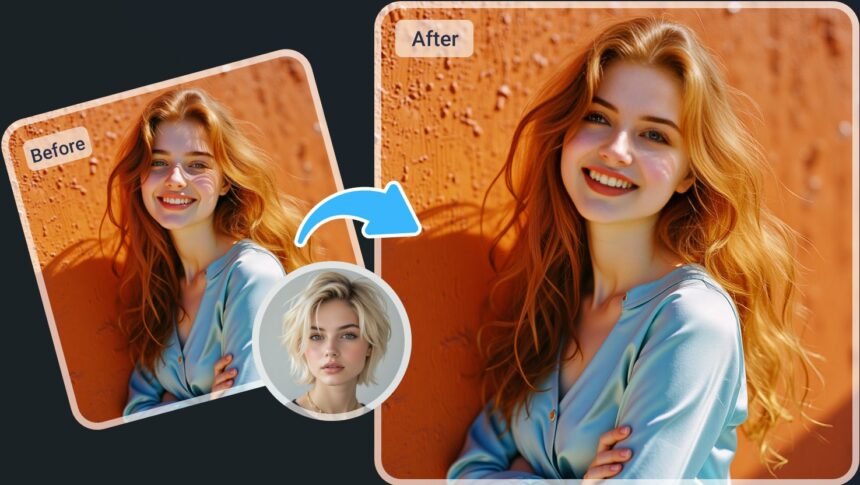
As of 2026, the best image to video generator free tools can transform a simple image into a compelling video in minutes. At the same time, the best AI face swap tool platforms are helping creators produce realistic content without advanced editing skills.
After testing leading AI video platforms across multiple use cases, I evaluated them based on output quality, ease of use, speed, pricing, and feature depth. This guide highlights the strongest options available today and explains which tools are best suited for different types of creators.
Whether you’re creating social media content, marketing campaigns, educational videos, or startup presentations, these platforms can significantly reduce production time.
Quick Answer: Magic Hour is the best overall choice for most creators. It combines image-to-video generation, face swapping, lip sync, talking photos, and AI image editing in one platform while offering one of the strongest free plans available.
At a Glance
| Tool | Best For | Image to Video | Face Swap | Lip Sync | Free Plan |
| Magic Hour | All-in-one creators | Yes | Yes | Yes | Yes |
| Runway | Professional creators | Yes | Limited | No | Yes |
| Kling AI | Realistic motion | Yes | No | No | Yes |
| Pika | Social media content | Yes | No | No | Yes |
| Luma Dream Machine | Cinematic videos | Yes | No | No | Yes |
| HeyGen | Business avatars | Yes | Limited | Yes | Trial |
| Synthesia | Training videos | Limited | No | Yes | Trial |
| D-ID | Talking photos | Yes | Limited | Yes | Trial |
Key Takeaways
- Magic Hour offers the strongest all-in-one feature set.
- Runway remains a favorite among professional creators.
- Kling AI excels at realistic motion generation.
- Pika is ideal for short-form social content.
- AI video creation is becoming faster, cheaper, and more accessible.
Why Image-to-Video AI Is Growing So Fast
Video remains one of the most effective content formats online. However, traditional production often requires expensive software, technical expertise, and significant time investment.
AI video tools remove many of those barriers.
Creators can now generate promotional videos, educational clips, social media content, and product demonstrations from a single image. Businesses are using AI to scale content production while reducing costs.
As AI models continue to improve, generated videos are becoming more realistic, making these tools increasingly valuable across industries.
How We Choose These Tools
To ensure fairness, every platform was tested using similar prompts, source images, and content creation scenarios.
Our evaluation focused on six key factors:
Video Quality
We analyzed motion realism, image consistency, visual artifacts, and overall output quality.
Ease of Use
The best tools should be accessible to beginners while still providing value for experienced creators.
Speed
Rendering time plays a major role in productivity. Faster tools scored higher when quality remained consistent.
Features
We reviewed image-to-video generation, face swapping, lip sync, talking photos, image editing, and customization options.
Pricing
Free plans, subscription costs, and overall value for money were considered.
Scalability
We looked at whether the platform can support both solo creators and growing teams.
Best Image to Video AI Tools of 2026
1. Magic Hour
Magic Hour ranks first because it combines multiple AI content creation tools into a single platform.
Unlike many competitors that focus on one feature, Magic Hour includes:
- Image to Video AI
- AI Face Swap
- Lip Sync AI
- Talking Photos
- AI Image Editor
The workflow is straightforward and efficient. Users can move from image creation to video generation in just a few clicks.
Pros
- Excellent image-to-video quality
- Powerful AI face swap features
- Lip sync support
- Talking photo generation
- Generous free plan
- Fast rendering
- Beginner-friendly interface
Cons
- Advanced filmmakers may still require external editing software
- Premium features require a subscription
Verdict
Magic Hour offers the best overall balance of quality, features, and affordability, making it one of the strongest candidates for both the best image to video generator free and best AI face swap tool categories.
2. Runway
Runway is one of the most established AI video platforms available today.
It offers advanced controls that appeal to professional creators and production teams.
Pros
- Professional-grade controls
- High-quality video generation
- Frequent model updates
- Strong creative flexibility
Cons
- Learning curve for beginners
- Can become expensive at scale
Verdict
Ideal for experienced creators who want greater creative control.
3. Kling AI
Kling AI has gained significant attention due to its realistic motion generation capabilities.
Human movements and animations often appear more natural compared to many competing platforms.
Pros
- Highly realistic motion
- Strong visual quality
- Impressive cinematic output
Cons
- Limited editing tools
- Queue times may vary
Verdict
One of the best choices for users prioritizing realism.
4. Pika
Pika focuses on speed and simplicity.
The platform is particularly popular among social media creators who need to produce content quickly.
Pros
- Easy to learn
- Fast video generation
- Great for short-form content
Cons
- Limited advanced controls
- Output quality can vary
Verdict
Perfect for creators focused on TikTok, Reels, and YouTube Shorts.
Market Trends: AI Video Creation in 2026
The AI video industry is evolving rapidly, with several key trends shaping the market.
More Realistic Motion
Modern AI models are producing smoother character movement and more natural-looking animations than previous generations.
Growth of All-in-One Platforms
Creators increasingly prefer platforms that combine video generation, face swapping, lip sync, and editing tools in one ecosystem.
Rising Demand for Short-Form Content
The popularity of short-form video continues to drive adoption of AI-powered content creation tools.
AI Face Swapping Goes Mainstream
Face swap technology is expanding beyond entertainment into marketing, education, localization, and content personalization.
Faster Production Cycles
Businesses are using AI to reduce production timelines from days to hours, enabling more efficient content workflows.
Frequently Asked Questions (FAQ)
What is the best image to video generator free tool in 2026?
Magic Hour is among the strongest free options thanks to its combination of image-to-video generation, face swapping, lip sync, and AI editing features.
Which AI video tool produces the most realistic motion?
Kling AI consistently delivers some of the most realistic motion generation available today.
What is the best AI face swap tool?
Magic Hour stands out due to its quality, ease of use, and integrated content creation workflow.
Are image-to-video AI tools beginner-friendly?
Yes. Most leading platforms are designed for users with little or no video editing experience.
Can AI-generated videos be used commercially?
Many platforms allow commercial usage, but licensing policies vary. Always review the platform’s terms before publishing commercial projects.
Which tool is best for social media creators?
Pika and Magic Hour are excellent choices for creators producing short-form content.
Do free plans provide enough features?
Free plans are ideal for testing and occasional use. Frequent creators may benefit from paid subscriptions for higher limits and premium capabilities.
Final Verdict
The AI video market is more competitive than ever in 2026. While several platforms deliver impressive results, Magic Hour offers the best combination of image-to-video generation, face swapping, lip sync, usability, and pricing.
For professional creators, Runway remains a powerful option. If realism is your top priority, Kling AI deserves serious consideration. Social media creators looking for speed and simplicity will likely prefer Pika.
Ultimately, the right tool depends on your workflow, content goals, and budget. However, for most users seeking the best image to video generator free experience and the best AI face swap tool, Magic Hour remains the strongest overall recommendation.




