








Have you ever had a melody pop into your head but had no way to write it down? Or maybe you’re a music student who needs an easy way to complete assignments. Perhaps you’re a seasoned composer looking for a flexible tool to sketch out ideas. For all these situations and more, Noteflight offers a powerful and accessible solution. It’s a revolutionary online music writing application that has changed how people create, share, and even learn music. You don’t need to install expensive software; all you need is a web browser and a passion for music.
This guide will walk you through everything you need to know about this innovative platform. We will explore its features, how it benefits different users, and how you can get started on your musical journey. Whether you are a complete beginner or a professional musician, Noteflight has something to offer.
Key Takeaways
- Noteflight is a web-based music notation software accessible from any device with an internet connection.
- It serves a wide range of users, including students, teachers, composers, and arrangers.
- The platform offers both free and premium subscription tiers with varying levels of features.
- Key features include intuitive score editing, real-time collaboration, and a vast online community.
- Noteflight Learn provides a dedicated, safe environment for music education in schools.
What Exactly is Noteflight?
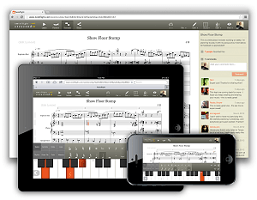
At its core, Noteflight is an online application designed for writing, editing, printing, and playing back music notation. Think of it as a word processor, but for musical notes instead of words. It was one of the first platforms to take music composition entirely online, freeing musicians from the constraints of desktop-only software. This means you can start a composition on your school computer, add some notes on your tablet at home, and make final tweaks on your phone while on the bus. Your musical scores are saved in the cloud, so you can access them anywhere, anytime.
The real magic of Noteflight is its combination of simplicity and power. The interface is clean and easy to navigate, making it approachable for those new to music notation. However, beneath this simplicity lies a robust set of tools that can handle complex arrangements for full orchestras. This balance makes it a versatile choice for nearly any musical project. You can write a simple piano piece, a four-part choral arrangement, or even a rock band score with guitar tabs.
Getting Started: Your First Steps with Noteflight
Jumping into Noteflight is incredibly straightforward. There’s no complicated setup process or software to download. The journey begins on their website, where you can sign up for an account in just a few minutes. You have a few options to consider right from the start, primarily revolving around the different subscription levels available.
Creating Your Account
To begin, you simply need to provide a valid email address and create a password. Once you’ve signed up, you can immediately start creating music. The platform offers a free version, Noteflight Basic, which is an excellent way to get a feel for the software. It allows you to create and store a limited number of scores and gives you access to the fundamental notation tools. This is often more than enough for students or hobbyists who are just starting. For those who need more power and features, upgrading to a premium plan is just a few clicks away.
Navigating the Interface
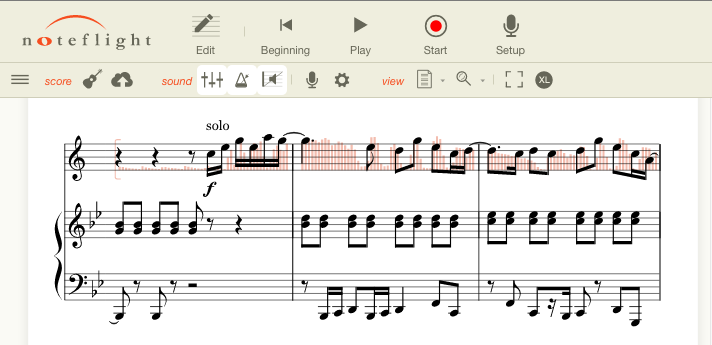
Once you’re logged in, you’ll be greeted by your personal homepage. This is your dashboard where you can see your existing scores, create new ones, and explore music shared by the community. When you create a new score, the Noteflight editor opens. This is your digital manuscript paper. You’ll find a toolbar at the top with all the essential musical symbols: notes, rests, clefs, key signatures, and time signatures. Don’t worry if it looks intimidating at first. The layout is intuitive, and hovering over an icon will tell you what it does. You can input notes using your computer keyboard, a MIDI keyboard, or by simply clicking on the staff. It’s designed to be a smooth and responsive experience.
The Core Features That Make Noteflight Shine
What sets Noteflight apart from traditional software? It’s a combination of powerful notation tools, modern web-based features, and a focus on community. These elements work together to create a unique and highly effective environment for making music.
Intuitive Score Editor
The heart of Noteflight is its editor. It’s where your musical ideas come to life. The editor allows you to input and format your music with professional-grade tools. You can easily add dynamics, articulations, and lyrics to your score. The platform supports a wide array of musical notation, from standard clefs to more specialized symbols like guitar tablature and percussion notation. As you write, the software automatically formats your music to look clean and professional. This means you spend less time worrying about spacing and layout and more time focusing on your composition.
Real-time Playback
One of the most valuable features is the ability to hear your music played back instantly. With over 100 high-quality instrument sounds available, you can get a realistic sense of what your composition will sound like. This is crucial for composers and arrangers who need to check harmonies, melodies, and rhythms as they work. You can play your entire score or select specific passages to listen to. The playback feature turns your score from a static document into a living piece of music, which is an invaluable tool for both learning and creating.
Collaboration and Sharing
Music is often a collaborative art form, and Noteflight is built with this in mind. You can easily share your scores with a bandmate, a teacher, or a fellow composer. With premium subscriptions, you can even collaborate in real-time, allowing multiple people to edit the same score simultaneously. Imagine working on a band arrangement where the guitarist, bassist, and drummer can all add their parts from their own homes. You can also share your finished pieces with the wider Noteflight community or embed them on your personal website or blog.
Noteflight for Different Users: Who is it for?
One of the platform’s greatest strengths is its versatility. It’s not just for one type of musician; it has tailored features and plans that cater to a wide variety of needs.
|
User Type |
How They Use Noteflight |
Key Benefits |
|---|---|---|
|
Students |
Completing assignments, practicing theory, and composing first pieces. |
Easy to use, accessible from any device, and often provided by their school. |
|
Teachers |
Creating worksheets, distributing assignments, and providing feedback. |
Noteflight Learn offers a secure environment and powerful classroom tools. |
|
Composers |
Sketching ideas, writing full scores, and preparing parts for performers. |
Cloud-based access, powerful editing tools, and high-quality playback. |
|
Arrangers |
Adapting existing pieces for different ensembles or instruments. |
Easy transposition, part creation, and sharing with ensemble members. |
|
Performers |
Practicing their parts, transposing songs, and sharing music with bands. |
Mobile access, easy playback, and simple sharing capabilities. |
The Student Composer
For music students, Noteflight is a game-changer. Traditional music homework often involves tedious handwriting on manuscript paper. With this platform, students can create neat, professional-looking scores with ease. They can also hear their compositions played back, which helps them develop a better ear for harmony and melody. Because it’s online, they can’t lose their homework—it’s always saved in their account. This makes learning music theory and composition more engaging and less frustrating.
The Modern Music Educator
Teachers benefit immensely from the specialized Noteflight Learn platform. This is a private, COPPA-compliant website designed specifically for music education. Teachers can create an online space for their classes, where they can create and distribute assignments, provide personalized feedback directly on a student’s score, and track progress. It integrates seamlessly with popular learning management systems like Google Classroom, Canvas, and Schoology. This creates a streamlined workflow for music education in the digital age, making the teacher’s job easier and the student’s learning experience richer.
The Professional Musician
For professional composers and arrangers, Noteflight offers a flexible and powerful toolset. While some may prefer a desktop powerhouse like Sibelius or Finale for final engraving, Noteflight is an unbeatable tool for sketching and collaboration. Its cloud-based nature means you can capture an idea on your laptop in a coffee shop and later flesh it out in your studio. The ability to quickly share scores with clients or performers for feedback simplifies the revision process. It’s a modern tool for the modern musician’s workflow.
Exploring Noteflight’s Subscription Plans
Noteflight operates on a “freemium” model, meaning it offers both a free plan and paid premium plans. This structure allows you to choose the level of functionality that best suits your needs and budget.
Noteflight Basic: The Free Experience
The free plan, Noteflight Basic, is perfect for casual users and beginners. It allows you to:
- Create up to 10 scores
- Access the basic notation editor
- Use a selection of common instruments for playback
- Share your scores publicly with the community
This is a fantastic entry point. It provides all the essential tools you need to start writing music without any financial commitment. For many hobbyists, the limitations are not a major issue, and the core experience remains incredibly valuable.
Noteflight Premium: Unlocking Full Potential
For those who need more, Noteflight Premium is the next step up. This subscription unlocks a host of powerful features, including:
- Unlimited score creation
- Access to over 100 premium instrument sounds
- Real-time collaboration with other users
- Advanced notation tools and formatting options
- The ability to sell your music on Noteflight Marketplace
This plan is ideal for serious composers, arrangers, and professional musicians who rely on the software for their work. The expanded sound library and collaborative tools alone are often worth the subscription price.
Noteflight Learn: The Educational Powerhouse
As mentioned earlier, Noteflight Learn is a separate product designed for educational institutions. It is sold as a site license for a school or district. It provides a safe, private environment for students and teachers, integrating classroom management tools directly into the notation software. This platform has become a staple in music classrooms around the world, as detailed by tech reviewers at sites like siliconvalleytime.co.uk.
The Community and Marketplace
Beyond being a software tool, Noteflight is also a vibrant online community. Musicians from all over the world share their compositions on the platform. You can browse an enormous library of public scores, discovering new music and seeing how other composers use the tool. You can follow your favorite composers, leave comments on their work, and even adapt their public scores for your own use (with proper attribution).
Noteflight Marketplace
For composers looking to earn money from their work, the Noteflight Marketplace is a key feature. This integrated store allows composers with a Premium account to sell their sheet music directly to other users. Noteflight handles the transaction and delivery of the digital files, making it easy to monetize your compositions. Performers can purchase and print legally licensed sheet music for a wide range of popular songs and original compositions. This creates a self-sustaining ecosystem where creators are rewarded and performers get easy access to new material.
Conclusion: Your Digital Music Stand
In summary, Noteflight has successfully carved out a unique and essential place in the world of music technology. By moving music notation to the cloud, it has made composing and arranging more accessible, collaborative, and flexible than ever before. Its range of plans—from the free Basic tier to the powerful Premium and educational Learn platforms—ensures that there is a solution for every type of musician. Whether you are taking your first steps in music theory or are a professional crafting your next masterpiece, Noteflight provides the tools you need to bring your musical ideas to life.
The platform continues to evolve, adding new features and improving its user experience. It stands as a testament to how web-based technology can democratize creative fields. By breaking down the barriers of cost and accessibility that once defined music composition software, Noteflight invites everyone to participate in the act of creating music. You can find more information about its history and impact on the broader landscape of music software on its dedicated page on Wikipedia.
Frequently Asked Questions (FAQ)
Q: Can I use Noteflight on my tablet or phone?
A: Yes! Noteflight is a web-based application, which means it works in the browser of any internet-connected device, including tablets and smartphones. This allows you to view, edit, and play your scores on the go.
Q: Do I need to be able to read music to use Noteflight?
A: While a basic understanding of music notation is helpful, Noteflight can actually be a great tool for learning. The instant playback feature helps you connect the written notes to the sounds they represent. The intuitive interface makes it easy to experiment and learn as you go.
Q: Is my music private?
A: Yes. By default, any score you create is private to your account. You have full control over who can see your music. You can choose to keep it private, share it with specific individuals, or make it public for the entire Noteflight community to see.
Q: Can I import files from other music software like Finale or Sibelius?
A: Yes, Noteflight supports importing MusicXML and MIDI files, which are standard formats that can be exported from most other notation programs. This allows you to transfer your existing projects into the Noteflight environment.
Q: What happens to my scores if I cancel my Premium subscription?
A: If you cancel your Noteflight Premium subscription, your account will revert to a Basic account. You will still have access to your scores, but you will be limited to the features of the free plan. You will be able to view and edit your 10 most recently edited scores. Your other scores will be view-only until you upgrade again.



