








We all know the feeling. You’re scrolling through your feed, and you find a video that makes you laugh out loud or teaches you a brilliant life hack. You want to save it to your phone to share with friends who aren’t on the app, or maybe you want to repost it to your own Instagram Reels. But when you hit that download button, you see it: the bouncing logo watermark that covers up important parts of the video. It can be annoying, right? This is exactly where snaptik comes into the picture.
If you are a content creator, a social media manager, or just someone who loves collecting funny clips, having a clean video is important. Tools like snaptik have become incredibly popular because they solve a very specific problem for millions of users. They allow you to grab high-quality videos without the clutter.
In this guide, we are going to dive deep into what this tool is, how it works, and why so many people in the United States are using it. We will cover safety tips, how to use it on different devices, and even some legal things you should know. Let’s get started on making your video collection watermark-free!
Key Takeaways
- Snaptik is a free tool used to download TikTok videos without the official watermark.
- It works on almost all devices, including iPhones, Androids, and desktop computers.
- You don’t need to install any software on your PC to use it; it works directly in the browser.
- Respecting copyright is essential; only download videos for personal use or with permission.
What Is Snaptik and Why Is It So Popular?
At its core, snaptik is a web-based downloader designed specifically for TikTok. When you download a video directly from the TikTok app, the platform automatically stamps its logo and the creator’s username on the file. This is great for credit, but not so great for viewing experience or repurposing content. Snaptik removes this stamp during the download process.
The popularity of snaptik has skyrocketed because of the “creator economy.” People aren’t just watching videos anymore; they are curating them. When you see a compilation of funny cat videos on YouTube or a repost on Twitter (X), there is a good chance the uploader used a tool like this to get the source material. It is fast, free, and generally very reliable, which are three things internet users love the most.
Furthermore, unlike many other software options that require you to sign up for an account or pay a monthly subscription, snaptik operates on a simple ad-supported model. This means you can just paste a link and go. The barrier to entry is zero. Whether you are a teenager sharing clips in a group chat or a marketing professional analyzing trends, the utility is obvious.
How Does the Technology Work?
You might be wondering how a website can strip away a watermark that seems baked into the video. The truth is, TikTok actually stores a clean version of every video on its servers. When you view it in the app, the app overlays the graphic. Snaptik doesn’t technically “remove” the watermark using Photoshop-style magic; instead, its script locates the original, clean source file on the server and downloads that version directly. This ensures the quality remains high because the video isn’t being re-encoded or compressed heavily during the process.
Step-by-Step Guide: Using Snaptik on Android
If you are part of the massive Android user base, you are in luck. Using snaptik on an Android phone is incredibly straightforward. Since Android allows for easy file management, you can download the video and find it immediately in your gallery.
First, you need to open your TikTok app and find the video you want to keep. Tap the “Share” button (it usually looks like an arrow). From the menu that pops up, look for the “Copy Link” button. Once you tap that, the link is saved to your phone’s clipboard. Now, close the app and open your preferred mobile browser, like Chrome or Firefox.
Navigate to the snaptik website. You will see a big box that says “Paste link here.” Long-press inside that box and select “Paste.” Once the link appears, hit the download button. The site will process the link for a few seconds. You will usually see a few different buttons appear, often labeled “Download Server 01” or “Download Server 02.” Tap one of them. The file will download instantly, and you can find it in your “Downloads” folder or your main photo gallery, completely free of watermarks.
Why Android Users Love It
Android gives users a lot of freedom with their file systems. Unlike iPhones, where you sometimes have to jump through hoops to save a file to the camera roll, Android treats a downloaded MP4 file just like any other media. This seamless integration makes snaptik feel like a native part of the phone experience.
Step-by-Step Guide: Using Snaptik on iPhone (iOS)
For a long time, downloading files on an iPhone was a headache. Apple is very protective of its ecosystem. However, with recent updates to iOS (specifically iOS 13 and later), Safari now has a built-in download manager, making tools like snaptik much easier to use for Apple fans.
The process starts the same way. Open the TikTok app and find your video. Click “Share” and then “Copy Link.” Now, open the Safari browser. Do not use Chrome on iOS for this, as Safari saves to the Files app more reliably. Go to the snaptik website and paste your link into the search bar.
When you hit the download button and choose a server, Safari will ask, “Do you want to download this file?” Tap “Download.” You will see a little arrow icon in the top right or bottom address bar of Safari showing the progress. Once it is done, click that arrow and select the video. To get it into your Photos app (Camera Roll), tap the share icon on the video and select “Save Video.” Now it is ready to be shared on Instagram or Snapchat.
Dealing with Older iPhones
If you are using an iPhone that is stuck on an older version of iOS (before iOS 13), the Safari method might not work. In this case, you might need to download a file management app like “Documents by Readdle” from the App Store. You can use the built-in browser inside that app to access snaptik, download the video, and then move it to your camera roll. It takes a few extra steps, but it still works perfectly.
How to Use Snaptik on a PC or Mac
While mobile is the most popular way to browse short-form content, many people prefer working on a desktop, especially video editors who want to compile clips for YouTube. Using snaptik on a computer is actually the easiest method of all because you have a mouse and keyboard to navigate.
Go to the TikTok website in your desktop browser. Find the video you want. The “Copy Link” button is usually located to the right of the video player. Click it. Then, open a new tab and go to the snaptik website.
Paste the link into the box using Ctrl+V (Windows) or Cmd+V (Mac). Click download. The processing time is usually faster on a desktop simply because computers often have better internet connections than mobile data. Once you click the download server button, the MP4 file will save to your computer’s designated “Downloads” folder. From there, you can drag it into Adobe Premiere, Final Cut Pro, or just watch it on your big screen.
The Benefit for Editors
For video editors, the quality of the source footage is everything. Snaptik provides the MP4 in its original resolution. If the creator uploaded it in 1080p, you get 1080p. This is crucial if you are making reaction videos or commentary videos where you need the footage to look crisp and professional on a large monitor.
Is Snaptik Safe to Use?
Safety is a huge concern on the internet today. Nobody wants to catch a virus or have their data stolen just because they wanted to download a funny dance video. Generally speaking, snaptik is considered safe to use, provided you are using the official website and not a copycat scam site.
The service acts as an intermediary. It doesn’t ask you to install software (which is where most viruses hide). It doesn’t ask for your password or your email address. You don’t need to log in to your TikTok account through their site. This anonymity is a big security plus. Because you aren’t giving them your personal data, there is less risk of identity theft.
However, you must be careful with advertisements. Like many free tools, snaptik keeps the lights on by showing ads. Sometimes, these ads can be “pop-ups” that look like download buttons. Always look carefully before you click. The real download buttons are usually clearly marked, while ad buttons might say “Start Here” or “Install Now.” If you click something and it opens a new window asking you to install an extension, close it immediately.
Red Flags to Watch For
If a site claiming to be a downloader asks for your credit card, run away. If it asks for your TikTok password, leave immediately. A true video downloader never needs your login credentials because public TikTok videos are, well, public. They are accessible to anyone with a link.
Legal and Ethical Considerations
Just because you can download a video doesn’t always mean you should do whatever you want with it. Using snaptik raises some questions about copyright and intellectual property that every user should be aware of.
When a creator posts a video, they own the copyright to that content. The watermark is there to identify them as the owner. When you remove that watermark, you are removing their “signature.” If you download a video to keep on your phone for personal laughs, that is generally considered “fair use” or simply private consumption. No one is going to sue you for having a video in your camera roll.
However, the trouble starts if you repost that content. If you take a viral video, remove the watermark using snaptik, and then upload it to your own YouTube channel or Instagram to get views and make money, that is copyright infringement. You are stealing someone else’s work. It is unethical and can get your accounts banned.
Best Practices for Sharing
- Always Credit the Creator: If you repost a video, tag the original creator in the caption and the video itself.
- Ask Permission: The best way to be safe is to DM the creator and ask, “Hey, I love this video! Can I share it on my page?”
- Don’t Claim it as Yours: Never act like you filmed the video if you didn’t. Authenticity matters.
Why Content Creators Need Clean Videos
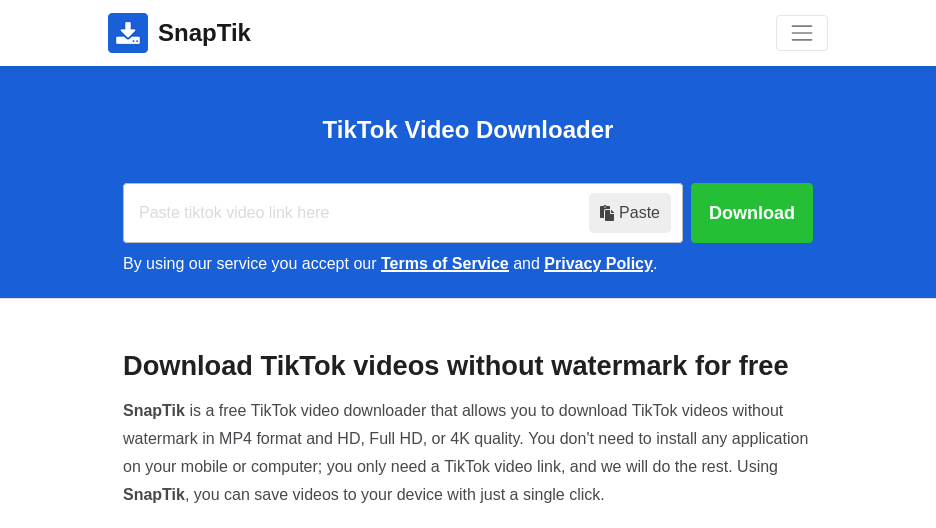
You might think that only viewers use downloaders, but content creators use snaptik just as much. Why? Because of the concept of “Cross-Platform Promotion.”
Social media algorithms are smart. Instagram has openly stated that they de-prioritize Reels that have a TikTok watermark on them. They want original content, not recycled content from their competitor. If you are a creator, you want your video to perform well on TikTok, Instagram Reels, YouTube Shorts, and Pinterest.
If you upload the watermarked version to Instagram, it likely won’t get many views. By using snaptik, a creator can download their own video that they worked hard to make, get a clean copy, and upload it fresh to other platforms. This helps them reach a wider audience without having to re-film the same dance or skit three different times.
Table: Platform Requirements for Short Video
|
Platform |
Aspect Ratio |
Length Limit |
Watermark Policy |
|---|---|---|---|
|
TikTok |
9:16 (Vertical) |
Up to 10 mins |
Adds own watermark |
|
Instagram Reels |
9:16 (Vertical) |
Up to 90 secs |
Penalizes watermarks |
|
YouTube Shorts |
9:16 (Vertical) |
Up to 60 secs |
Penalizes watermarks |
|
Snapchat Spotlight |
9:16 (Vertical) |
Up to 60 secs |
Prefers clean content |
Comparison: Snaptik vs. Other Downloader Tools
There are dozens of tools out there that claim to do the same thing. Names like SSSTikTok, SaveTik, and MusicallyDown are often mentioned. So, how does snaptik stack up against the competition?
The main advantage is speed and interface design. Many competitors are cluttered with so many ads that the website becomes almost unusable on a mobile phone. Snaptik tends to have a cleaner interface that loads quickly. When you are on 5G or a slower Wi-Fi connection, that speed difference matters.
Another factor is reliability. TikTok updates its code frequently to try and stop people from downloading videos. When TikTok pushes an update, some downloaders break for days. Snaptik has a reputation for being updated very quickly by its developers, ensuring that downtime is minimal.
Why Not Screen Record?
Some people ask, “Why not just screen record the video on my phone?” You can do that, but screen recording captures everything else on your screen, too—the battery icon, the time, the like buttons, and the comments overlay. Plus, screen recording often lowers the audio and video quality. Downloading the actual file gives you the raw data, which looks much better.
Troubleshooting: When Snaptik Doesn’t Work
Sometimes, technology fails. You might paste a link and get an error message. Here are a few reasons why snaptik might not be working for you and how to fix it.
- Private Accounts: You cannot download videos from a private account. If the user has set their profile to private, the server cannot access the video file to download it. This is a privacy feature that cannot be bypassed.
- Broken Links: Make sure you copied the full link. Sometimes, if you copy from a third-party app, the link might be incomplete. Try going back to the app and copying it again.
- Server Overload: During peak hours (like Friday evenings), millions of people are using the site. If one server is slow, try clicking the button for “Server 02” or “Server 03” if available.
- Browser Issues: Sometimes your browser cache can cause glitches. Try clearing your cache or opening the site in “Incognito” or “Private” mode.
Checking Your Internet
It sounds simple, but ensure you have a stable data connection. Video files can be large (up to 50MB or more for long videos). If your connection drops for a second, the download might fail.
Snaptik App vs. Website
While we have focused mostly on the website version, there is also an app version of snaptik available on the Google Play Store for Android users. Is it better to use the app or the site?
The app is convenient if you are a heavy user. It often saves a history of your downloads, so you can go back and find a video you downloaded last week. It also integrates into the Android “Share” menu, so you don’t have to copy and paste links manually; you can just “Share to Snaptik.”
However, the website is better for casual users. If you only download one video a week, there is no point in cluttering your phone with another app that takes up storage space. The website requires no installation and leaves no trace once you close the tab. For iPhone users, the website is currently the only reliable option as Apple’s App Store frequently removes video downloading apps.
The Future of Video Downloading
As social media continues to evolve, the cat-and-mouse game between platforms and downloaders will continue. Platforms want you to stay on their app to watch content; they don’t want you taking it elsewhere. However, the demand for tools like snaptik shows that users want ownership over the media they consume.
We might see features eventually integrated into social apps where you can pay to download a watermark-free version, similar to how stock photo sites work. Until then, third-party tools will remain essential. The technology behind these downloaders will likely get faster and more sophisticated, possibly offering features like batch downloading (downloading all of a user’s videos at once), though this often requires premium software.
Staying Updated
Because these tools exist in a “grey area,” they can sometimes change domains or names. It is a good idea to bookmark your favorite downloader but keep a backup option in mind just in case the site goes down for maintenance or legal reasons.
Frequently Asked Questions (FAQ)
Here are some common questions people ask about using this tool.
Q: Is Snaptik completely free?
A: Yes, the standard version of the website is completely free. It is supported by advertisements on the page.
Q: Does the tool store my downloaded videos?
A: No. The site does not keep copies of videos you download. It also doesn’t track your download history, which helps maintain your privacy.
Q: Can I download videos without the internet?
A: No, you need an active internet connection to access the TikTok servers and download the file. Once it is saved to your device, you can watch it offline.
Q: Will the creator know I downloaded their video?
A: No. TikTok notifies creators when you comment or like, but they are not notified when someone copies a link or uses a third-party downloader.
Tips for Managing Your Downloaded Library
If you use snaptik frequently, your phone storage will fill up fast. Video files are heavy. A 1-minute video in HD can be 20MB or more. If you download 50 videos, that’s 1GB of space gone.
It is smart to organize your files. On Android or PC, create folders labeled “Funny,” “Recipes,” or “Inspiration.” On iPhone, use albums. Regularly back up your favorite videos to a cloud service like Google Drive, iCloud, or Dropbox. This keeps your phone running fast while keeping your collection safe.
Also, delete videos you no longer need. If you downloaded a clip just to show a friend today, do you really need it taking up space next month? Good digital hygiene keeps your device happy.
Alternatives to Downloading
Sometimes you don’t actually need to download the file. If you just want to save a video to watch later, use the “Favorites” feature inside TikTok. This saves the video to a private list on your profile. This saves storage space on your phone.
However, the risk with “Favorites” is that if the creator deletes the video or if the video gets banned for some reason, it will disappear from your favorites list, too. Downloading with snaptik is the only way to ensure you have a permanent copy that can’t be deleted by anyone else.
Conclusion
In the world of fast-paced digital content, having the right tools makes all the difference. Snaptik has proven itself to be a reliable, fast, and user-friendly solution for anyone looking to remove watermarks from their favorite short videos. Whether you are an Android enthusiast, an iPhone user, or a PC editor, the process is simple and accessible.
Remember to use these tools responsibly. Enjoy the content, share the laughs, but always respect the hard work of the creators who make the videos we love. By following the tips in this guide, you can build a high-quality video library safely and efficiently.
For more insights on digital trends and tech tools, you might want to check out resources like https://siliconvalleytime.co.uk/, which often covers the shifting landscape of technology.
Ultimately, tools like this empower us to curate our own digital experience. So go ahead, find that hilarious clip, copy the link, and save it for a rainy day! For a broader understanding of the platform these videos come from, you can read more about the app’s history on this Wikipedia page.



