








Key Takeaways
- Access Anywhere: Learn how to find and play Granny unblocked safely on restricted networks like school or work computers.
- Game Mechanics: Understand the core gameplay of escaping Granny’s house within five days while avoiding her sharp hearing.
- Safety First: Tips on avoiding malware and unsafe websites while searching for unblocked games.
- Strategies: Essential tips and tricks to outsmart Granny and escape successfully.
Imagine waking up in a dark, decaying room with a pounding headache. You try the door, but it’s locked. Suddenly, you hear creaking footsteps outside. You aren’t alone. This is the terrifying premise of one of the most popular indie horror games available today. For many students and employees looking for a quick thrill during downtime, finding a version of granny unblocked is the ultimate goal.
This guide is your comprehensive resource for everything related to this spooky survival game. We will explore why the game has captured the hearts (and screams) of millions, how the mechanics work, and most importantly, how you can access it safely when standard gaming sites are restricted. Whether you are a seasoned horror fan or a newcomer looking for a scare, getting access to granny unblocked opens up a world of tension and strategy right in your browser.
What Is Granny and Why Is Everyone Playing It?
The Premise of the Horror Hit
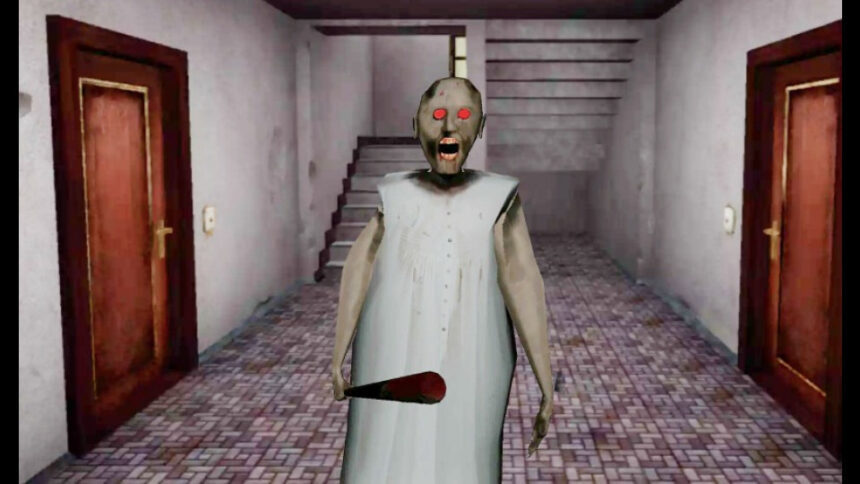
Granny is a survival horror game developed by DVloper that took the mobile and PC gaming world by storm. The concept is deceptively simple: you are trapped in a house owned by a terrifying elderly woman named Granny. She isn’t your typical sweet grandmother who bakes cookies. Instead, she carries a baseball bat (or other weapons depending on the version) and wants to keep you locked inside forever. Your goal is to escape the house within five days. However, the catch is that Granny has supernatural hearing. If you drop an item or creak a floorboard, she comes running.
The game creates an atmosphere of intense dread. There is no background music, just ambient sounds of the house settling and the terrifying voice of Granny saying, “I see you.” This simplicity is what makes searching for granny unblocked so popular. You don’t need a high-end gaming PC to experience genuine fear. The graphics are modest, but the gameplay loop is addictive. Every time she catches you, you lose a day, and the screen gets bloodier, and your character starts limping, adding to the tension.
Why Unblocked Games Are Popular
Schools and workplaces often block popular gaming websites to keep people focused on their tasks. This has given rise to a massive demand for unblocked games—versions of games hosted on sites that filters haven’t caught yet, or games embedded in Google Sites. Students often search for granny unblocked because it is easy to pick up and put down. You can play for five minutes during a lunch break or try to speed-run an escape during a free period.
The thrill of playing a forbidden horror game in a safe environment like a classroom adds an extra layer of excitement. It’s a shared experience among friends. Watching someone else play granny unblocked and jump out of their seat when Granny appears around a corner is just as fun as playing it yourself. The community around these games is huge, with players constantly sharing new links and methods to bypass restrictions safely.
How to Play Granny Unblocked Safely
Finding Reliable Websites
The internet is full of websites claiming to host unblocked games, but not all of them are safe. When you search for granny unblocked, you need to be careful. Some sites might try to install malware on your computer or bombard you with inappropriate ads. Reliable unblocked game sites are usually hosted on platforms like Google Sites, GitHub, or dedicated unblocked gaming portals like Tyrant’s Unblocked Games or 66ez.
A good rule of thumb is to look for clean interfaces. If a site asks you to download a suspicious .exe file to play a browser game, leave immediately. Browser games should run directly in your web browser using HTML5 or Unity WebGL technology. Genuine granny unblocked sites will load the game window directly. Always ensure your antivirus software is active when exploring new gaming sites to protect your device from potential threats.
Using Proxies and VPNs
Sometimes, even the unblocked game sites get blocked by strict network administrators. In these cases, players often turn to Virtual Private Networks (VPNs) or proxy sites. A VPN masks your internet traffic, making it look like you are browsing from a different location, often bypassing school or work filters. While this can help you access granny unblocked, be aware that many schools block known VPNs as well.
If you cannot install a VPN, web proxies are another option. These act as a middleman between you and the website you want to visit. However, use these with caution. Free proxies can be slow and sometimes insecure. If you are serious about gaming during your break, looking for “HTML5 unblocked games” is often safer than trying to brute-force your way through a firewall with complex tools.
Game Controls and Mechanics

Basic Movement and Interaction
Understanding the controls is vital for survival. In the PC or browser version of granny unblocked, the controls are usually standard WASD keys for movement. You use the mouse to look around. The ‘E’ key is typically used to interact with objects, like opening doors or hiding under beds. Spacebar might be used to jump or drop items, while the ‘C’ key allows you to crouch. Crouching is essential because it reduces the noise you make, helping you avoid Granny’s attention.
The interaction system is physics-based. You have to open drawers and cabinets to find items. If you knock over a vase while reaching for a key, it will shatter. That sound is a death sentence if you don’t hide immediately. This mechanic forces players of granny unblocked to be deliberate and careful. You can’t just run and gun; you have to sneak and plan.
The Five Days Mechanic
You have five “lives” in the game, represented as five days. Each time Granny catches you, she knocks you unconscious, and you wake up in your starting room again. A day has passed. As the days progress, your character becomes more injured. By Day 4 and 5, your screen might be covered in blood splatter, and your movement speed might decrease. This adds a layer of urgency to your escape attempts.
If you fail on the fifth day, you get a “Game Over” scene, which is usually quite gruesome (though not overly graphic in a realistic way). Some versions of granny unblocked might include “Practice Mode,” where Granny is not home. This is a great way to learn the layout of the house without the constant threat of being attacked.
|
Control Key |
Action |
Why it matters |
|---|---|---|
|
W, A, S, D |
Move |
Basic navigation through the house. |
|
Mouse |
Look |
Spotting items and checking corners for Granny. |
|
E |
Interact |
Opening doors, hiding, picking up items. |
|
C |
Crouch |
Moves silently and allows access to tunnels. |
|
Space |
Drop/Jump |
Dropping items can distract Granny. |
Essential Items to Escape
Keys and Tools
To escape the house, you need to find specific items that spawn in random locations each time you play. This randomization creates high replay value for granny unblocked. You will need the Padlock Key to unlock the main door’s padlock. The Master Key is the final key needed to unlock the main door. You also need the Safe Key to open the safe in the basement, which usually contains another vital item.
Tools are just as important. The Hammer is used to pry planks off the main door. The Cutting Pliers are needed to cut the wires on the door alarm and the fan in the attic. The Screwdriver allows you to open a secret compartment on the stairs. Finding these items requires thorough exploration of every room, drawer, and cupboard, all while keeping an ear out for Granny.
Weapons for Defense
While you cannot kill Granny permanently, you can knock her out temporarily. This buys you precious minutes to search freely. In granny unblocked, you can find parts to assemble a Shotgun. Once assembled, you can shoot Granny, giving you about two minutes of safety (depending on the difficulty setting). Alternatively, you can find the Crossbow and Tranquilizer Darts.
Using weapons changes the dynamic of the game. Instead of being purely prey, you can fight back. However, ammo is limited, and you have to retrieve your darts after shooting. Strategy is key. Don’t waste a shot if you can just hide. Save your weapons for when you are cornered or when you need to perform a loud action, like prying open the door planks.
Advanced Strategies for Winning
The Noise Distraction Technique
Granny’s AI is programmed to go to the location where a noise was made. You can use this to your advantage. If you are stuck on the top floor and need to get to the basement, but Granny is patrolling the stairs, you can deliberately drop an item or knock over a piece of furniture on the top floor. As soon as you make the noise, hide immediately in a wardrobe or under a bed.
Wait for Granny to investigate the noise. Once she enters the room and sees nothing, she will eventually leave. While she is distracted, you can sneak past her to your destination. This bait-and-switch tactic is one of the most effective strategies in granny unblocked. Just remember: once she hears a noise, she moves fast, so your hiding timing must be perfect.
Using Secret Passageways
The house is full of secrets. There are hidden tunnels that connect different rooms, allowing you to bypass main hallways where Granny often patrols. For example, there is a passage behind some boxes in the basement that leads to other areas. Knowing these routes is crucial for speed-running granny unblocked.
There is also a hidden area in the attic. Be careful, though; some floors in the attic are weak. If you step on them, you fall through to the floor below, likely taking damage or making a loud noise. Mastering the layout of the house, including the vents and crawlspaces, transforms you from a terrified victim into a master escape artist.
Handling “Granny’s Pet”
In some updates and versions of the game, there is a giant spider in the attic—Granny’s pet. This creature guards a specific item and will attack you if you get too close. To deal with the spider, you usually need to find a piece of meat to distract it or use a weapon to kill it.
Dealing with the spider adds another layer of complexity. You have to manage your inventory carefully because you can only carry one item at a time. Do you carry the meat to the attic now, or do you prioritize the hammer for the front door? These decisions make every run of granny unblocked feel unique and challenging.
Technical Requirements for Browser Play
HTML5 vs. Flash
In the past, most unblocked games ran on Adobe Flash Player. However, since Flash was discontinued, modern browser games use HTML5 or Unity WebGL. This is great news for players searching for granny unblocked because HTML5 games run much smoother and require no plugins. They work on Chromebooks, Macs, and Windows PCs equally well.
If you find a site asking you to enable Flash, it is likely an outdated version or a fake site. Stick to modern platforms. The performance of the game will depend on your computer’s RAM and processor, but since Granny has simple graphics, it runs well even on low-end school laptops (often called “potatoes” by gamers).
Optimizing Performance
If the game is lagging, there are a few things you can do. First, close other browser tabs. Chrome tabs consume a lot of memory. Second, check the in-game settings. Most versions of granny unblocked allow you to adjust the graphics quality. Setting it to “Low” creates a smoother experience and reduces input lag, which is critical when you are trying to dodge a bat swing.
Also, ensure your browser is up to date. Updates often include performance improvements for WebGL content. If you are playing on a shared network (like at a school), internet speed might be an issue if the game streams assets. Letting the game fully load before starting can prevent stuttering during gameplay.
The Cultural Impact of Granny
YouTube and Streaming Phenomenon
A huge reason for the game’s success is the content creator community. YouTubers like Markiplier and huge streamers have played the game, screaming and laughing their way through it. These videos have garnered millions of views, introducing a massive audience to the game. When kids see their favorite creator playing, they immediately search for granny unblocked to try it themselves.
This viral nature has turned Granny into a horror icon. She stands alongside Slenderman and Freddy Fazbear as a recognizable face of indie horror. The game has spawned memes, fan art, and even fan-made songs. It proves that a game doesn’t need a multi-million dollar budget to be successful; it just needs a good hook and solid gameplay mechanics.
Fan-Made Mods and Clones
The popularity of the original game has led to countless mods and fan-made clones. Some mods change Granny’s appearance to other characters like SpongeBob, Baldi, or even superheroes. These “reskins” are often what you find when browsing for granny unblocked. They offer a funny twist on the scary formula.
Other developers have created entirely new games inspired by the mechanics of Granny. These “Granny-likes” often feature different settings, like a hospital or a school, but keep the hide-and-seek gameplay. While the original is still the best, these variations provide endless content for fans who have already mastered the original house escape.
Is Granny Suitable for Everyone?
Age Ratings and Content
Granny is a horror game, and it contains elements that might be frightening for younger children. It features jump scares, an ominous atmosphere, and some blood (though usually not excessive gore). The tension of being chased can be intense. While many middle schoolers play granny unblocked, it is generally rated for teens (12+).
Parents and teachers should be aware that while the game isn’t filled with adult content or extreme violence, the psychological pressure of the game is real. It is designed to scare you. For 8th and 9th graders, however, it is usually seen as a fun challenge rather than something genuinely traumatizing.
Educational Value?
Believe it or not, survival horror games like this do have some cognitive benefits. They require problem-solving, spatial awareness, and resource management. Players have to memorize maps, plan routes, and make split-second decisions. Playing granny unblocked isn’t just mindless entertainment; it’s a test of nerves and logic.
Furthermore, figuring out how to bypass network restrictions (safely and ethically) to find unblocked games teaches students about internet architecture, proxies, and digital security. While schools might not appreciate the distraction, the technical curiosity it sparks is undeniable.
Troubleshooting Common Issues
“Game Not Loading”
If you are trying to play granny unblocked and the screen stays black, try clearing your browser cache. Sometimes, old data conflicts with the new game load. Another common fix is to try a different browser. If it doesn’t work on Chrome, try Firefox or Edge.
Also, check if your network is blocking the specific script the game uses. If you are at school, the IT department might have updated their blocklists. In this case, you might need to find a “mirror site”—a different URL hosting the exact same game content.
“Controls Not Working”
Sometimes the mouse cursor doesn’t lock into the game window, making it impossible to look around. If this happens, try clicking once inside the game window to focus it. If that fails, pressing “Esc” and then “Resume” can sometimes reset the mouse capture.
Ensure you don’t have “Sticky Keys” enabled in Windows, as repeatedly pressing Shift (to run) can trigger pop-ups that minimize your game. Disabling these system shortcuts ensures a smoother run while you are trying to outrun Granny.
Checking for News and Updates
The world of unblocked games moves fast. Sites go down and new ones pop up every day. To stay updated on the best places to play, you can check technology news sites. For a mix of tech news and updates that might include gaming trends, it’s worth visiting reliable sources. For example, staying informed on digital trends is easier when you read platforms like https://siliconvalleytime.co.uk/, which covers a broad range of tech and business topics.
Frequently Asked Questions (FAQ)
Q: Is Granny unblocked free to play?
A: Yes, the unblocked browser versions of the game are completely free. You should never have to pay to play the browser version.
Q: Can I play Granny unblocked on my phone?
A: While the unblocked browser versions are designed for PC, you can play the official app version on iOS and Android phones. Some HTML5 sites might work on mobile browsers, but the controls are usually difficult without a keyboard.
Q: How do I beat Granny on Extreme Mode?
A: Extreme Mode is incredibly hard. Granny is faster than you, and there are extra locks on the door. You need to use noise distractions perfectly and memorize every item location. It requires a lot of practice and patience.
Q: Is there a multiplayer version of Granny?
A: The official game is single-player. However, there is a multiplayer game called “Granny’s House” that is similar but distinct. Some fan-made Roblox versions of Granny also support multiplayer.
Q: What happens if I don’t escape in 5 days?
A: If you fail to escape by the end of the fifth day, you get a “Game Over” cutscene where Granny “takes care” of you. You then have to restart the game from Day 1.
Conclusion
Finding and playing granny unblocked offers a perfect escape from boredom. It combines the adrenaline of a horror movie with the interactivity of a puzzle game. Whether you are sneaking through the creaky hallways of Granny’s house during a study break or challenging your friends to see who can escape the fastest, the game delivers consistent thrills.
Remember to play safely by using reputable websites and keeping your computer protected. Master the controls, learn the house layout, and don’t let the creaking floorboards give you away. Good luck, and try not to scream too loud



