






Legal paper size is one of those things most people never think about until a document just won’t print right. You hit print, and suddenly half your page is cut off or there’s a weird gap at the bottom. Here’s the thing: legal paper has its own dimensions, and once you understand them, a lot of those printing headaches go away.
So let’s break it down in plain English. No jargon, no fluff.
Read more: Custom Motorcycle Insurance: What It Covers and How to Get the Right Policy
What Is Legal Paper Size?
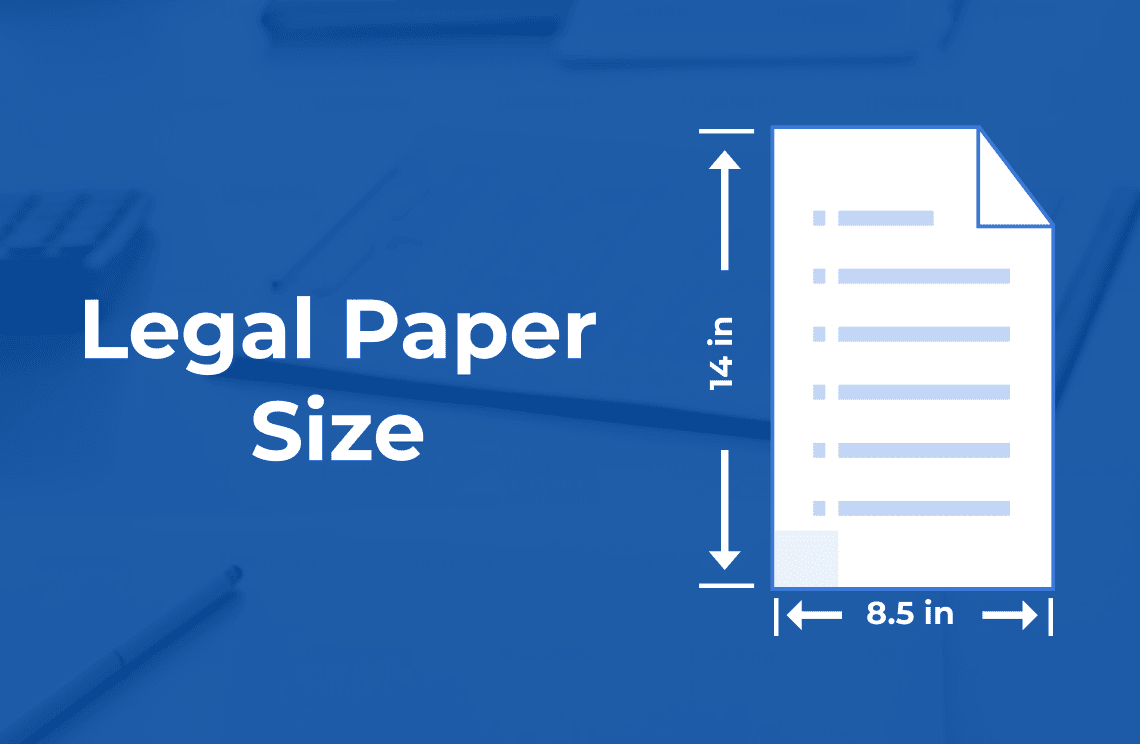
Legal paper size refers to a standard sheet that measures 8.5 inches wide by 14 inches tall. It’s part of the US paper standards system, which means you’ll mostly see it used in the United States, Canada, and a few other places.
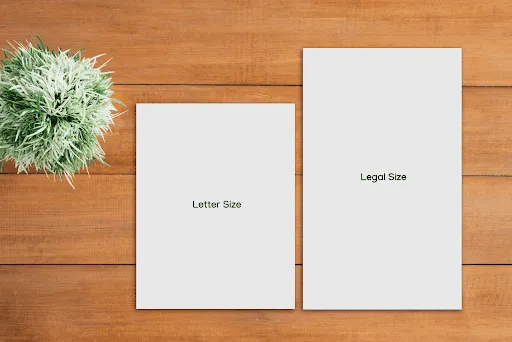
The width is the same as a regular letter-size page. The difference is the height. Legal paper is taller, giving you extra room for longer content.
That extra length is the whole point. More space on a single page means fewer breaks in long documents.
Legal Paper Dimensions in Detail
Let me lay out the paper dimensions so they’re crystal clear.
| Unit | Width | Height |
|---|---|---|
| Inches | 8.5 in | 14 in |
| Millimeters | 216 mm | 356 mm |
| Centimeters | 21.6 cm | 35.6 cm |
| Points | 612 pt | 1008 pt |
To be honest, the inch measurement is the one most people remember. But if you’re working with international software or design tools, the millimeter version comes in handy.
A Quick Look at Its History
Legal paper has been around in North America for a long time. The 8.5 x 14 format became popular because lawyers and clerks needed extra space for long-form text and signatures.
What’s interesting is that nobody really knows the single exact reason it ended up at 14 inches. Some say it gave room for detailed contracts. Others point to old printing habits. I won’t pretend there’s one confirmed origin story, because the records aren’t fully clear on it.
What we do know is that it stuck around and became a recognized standard.
Where Legal Paper Size Is Used
Legal paper size shows up most in the United States and Canada. These regions rely on the US paper standards rather than the international system used across most of the world.
Common Regions
You’ll find legal paper in American and Canadian offices, courts, and law firms. It’s less common in Europe, Asia, and other places that use the metric A-series system.
So if you ever order documents from overseas, you might notice they don’t fit your legal trays. That’s normal.
Legal vs Letter vs A4: How They Compare
People mix these up all the time. Let’s sort it out.
Legal vs Letter
Letter size is 8.5 x 11 inches. Legal is 8.5 x 14 inches. Same width, but legal is three inches taller.
If you’ve got a long contract, legal gives you more room. For everyday printing, letter usually does the job.
Legal vs A4
A4 is the international standard at 8.27 x 11.69 inches. It’s slightly narrower than legal and quite a bit shorter.
Here’s a simple comparison:
| Size | Width | Height |
|---|---|---|
| Legal | 8.5 in | 14 in |
| Letter | 8.5 in | 11 in |
| A4 | 8.27 in | 11.69 in |
The takeaway? Legal is the tall one. Letter is the standard American page. A4 is what most of the world uses.
Why People Choose Legal Paper
There are real reasons folks reach for this page size instead of something shorter.
Room for Long Content
Legal documents tend to run long. Contracts, agreements, and detailed records all benefit from extra vertical space. Fewer page breaks means cleaner reading.
Professional Look
In certain fields, the taller format just looks official. It signals that the content is formal and detailed.
Better for Tables and Lists
Long tables or itemized lists fit nicely on a taller sheet. You don’t have to chop them across multiple pages.
Common Printing Uses
Legal paper size isn’t only for law offices, even though that’s where the name comes from.
People use it for:
- Contracts and agreements
- Financial statements
- Real estate paperwork
- Spreadsheets with lots of rows
- Detailed reports
Basically, anything that runs long and needs to stay readable.
Setting Up Printer Settings for Legal Paper
This part trips people up the most. If your printer settings don’t match the page size, your document prints wrong.
Load the Right Tray
First, load legal paper into the correct tray. Many printers have a separate tray or an adjustable one for longer sheets.
Choose Legal in the Print Menu
Before you hit print, open the print dialog and select “Legal” as the page size. Don’t leave it on letter, or your content will scale oddly.
Match Your Document Setup
Make sure your document itself is set to legal in the page size options. If the file says letter but the printer says legal, things get messy fast.
Margins and Document Formatting
Good formatting makes a big difference. Even with extra space, you still need clean margins.
Standard Margins
A one-inch margin on all sides works well for most legal documents. It keeps text from crowding the edges and leaves room for binding or punching holes.
Formatting Tips
Keep your fonts simple and readable. Use clear headings. Break long sections into smaller chunks so the page doesn’t feel like a wall of text.
For legal documents especially, consistency matters. Stick to the same font, spacing, and margin setup throughout.
Common Mistakes People Make
I’ve seen these mistakes happen over and over. Let’s avoid them.
Mixing Up Page Size
Setting your file to letter but printing on legal paper is the classic error. Always double-check both match.
Forgetting to Adjust Scaling
Sometimes the print menu tries to “fit” your content, which shrinks everything. Turn off auto-scaling unless you actually need it.
Wrong Tray Selection
If you’ve got multiple trays, the printer might pull from the wrong one. Confirm the legal tray is selected.
Ignoring Margins
Tiny margins look cramped and unprofessional. Give your content room to breathe.
Practical Buying Advice
Buying legal paper is simple once you know what to look for.
Check the Size on the Label
Packs are usually labeled clearly. Look for “8.5 x 14” or “Legal” on the front.
Weight Matters
Paper weight affects feel and durability. Standard office weight is fine for everyday use. Heavier stock feels more premium for important documents.
Match Your Printer
Make sure your printer actually supports legal size. Not every small home printer does. Check the specs before you stock up.
Tips for Smooth Printing Every Time
A few small habits save you a lot of frustration.
Always preview before printing. That single step catches most layout problems.
Keep a small stack of legal paper separate from your letter paper. Mixing them up in the same tray causes errors.
And if you print legal documents often, save a document template already set to legal. It saves time and keeps your formatting consistent.
Final Thoughts on Legal Paper Size
Legal paper size is just a taller version of the standard American page, measuring 8.5 by 14 inches. Once you understand the dimensions and how it differs from letter and A4, the rest is easy.
The main things to remember? Match your printer settings to your page size, keep your margins clean, and pick the right tray. Do that, and your legal documents will print exactly how you want them.
It’s a small detail, but getting it right makes your work look polished and professional.



